

TL;DR: n8n is the most powerful automation tool available in 2026 — but it’s not the easiest to get running. If you want the power without the pain of self-hosting, n8n LaunchPad gives you a fully deployed n8n instance starting at $6/month. No Docker. No VPS. No headaches.
Table of Contents
The Real Question Nobody’s Asking Honestly
Every “n8n review” you’ll find online falls into one of two camps: either it’s a surface-level listicle that just copy-pastes the feature list from the official docs, or it’s written by someone who barely touched the product. Neither of those is useful to you.
So let me be direct about where this post is coming from.
We run n8n LaunchPad — a managed platform that deploys n8n for people who don’t want to mess with servers. That means we live inside n8n every single day. We’ve seen where it absolutely dominates, where it frustrates people, and where the competition genuinely beats it.
This is that honest breakdown.
By the end of this post, you’ll know:
- Whether n8n is actually the best automation tool for your use case
- How it stacks up against Zapier and Make in 2026 with real pricing math
- What n8n 2.0 changed and why it matters for AI workflows
- And the one thing that stops most people from ever getting started with it
Let’s get into it. Is n8n the best automation tool?
What Is n8n, Actually?
If you’ve only heard the name thrown around in automation communities, here’s the quick version.
n8n (pronounced “n-eight-n”) is an open-source, self-hostable workflow automation platform built on Node.js. It uses a node-based visual editor where you connect “nodes” together to create automated workflows — called triggers, which start the process, and actions, which do the work.
Think of it like Zapier or Make, but with the handcuffs removed.
You can:
- Connect 500+ apps and APIs out of the box
- Write custom JavaScript or Python inside nodes when you need logic that no pre-built integration covers
- Self-host it on your own server for unlimited workflows and executions at near-zero cost
- Build full AI agents with persistent memory, LangChain integration, and multi-model support
It launched in 2019, hit $40M ARR in 2025, raised $180M in Series C funding backed by Nvidia’s NVentures, and as of mid-2026 sits at a reported $1.5–2.5 billion valuation. Those aren’t vanity metrics — that’s enterprise adoption happening at scale. <!– 📸 IMAGE SUGGESTION #2 — WHAT IS N8N EXPLAINER Placement: After the “What Is n8n, Actually?” section heading or after the bullet list Prompt: “A split-screen illustration showing a simple drag-and-drop automation workflow canvas on the left with colorful connected nodes, and a complex technical API connection on the right, representing the flexibility of n8n from simple to advanced. Clean white background, flat design, vibrant colors.” Alt Text: n8n node-based visual workflow editor showing drag and drop automation –>
Why This Question Is Blowing Up Right Now
The automation tool market in 2026 is not the same as it was two years ago.
Zapier’s been hiking prices. Make.com shifted to a credit-based system in August 2025 that confused a lot of people. And AI has completely changed what people expect from automation tools — they don’t just want to “connect apps” anymore, they want to deploy autonomous agents that can think, reason, and execute multi-step tasks without human hand-holding.
Here’s what’s happened specifically that’s pushing n8n into the spotlight:
1. Zapier price fatigue is real. Zapier charges per task — meaning every single step in a workflow counts as a billable unit. A 10-step automation running 1,000 times = 10,000 tasks billed. On n8n? That same workflow = 1,000 executions. The math is brutal for anyone running complex, high-volume workflows on Zapier.
2. n8n 2.0 shipped in January 2026. This wasn’t a minor update. n8n went from being an automation tool to an AI orchestration platform. It shipped native LangChain integration, 70+ dedicated AI nodes, persistent agent memory across executions, vector database support for RAG workflows, and multi-agent orchestration. That’s not something Zapier or Make can match technically — not even close.
3. The self-hosting crowd is growing. Post-pandemic data privacy concerns, plus a wave of SaaS price increases across the board, pushed a lot of teams toward tools they actually own. n8n’s self-hosted Community Edition is 100% free with unlimited executions. The only cost is a server, which can run as cheap as $3–7/month.
So the question isn’t really “is n8n good?” — the data shows it clearly is. The real question is: is n8n the right tool for you, and are the trade-offs worth it? <!– 📸 IMAGE SUGGESTION #3 — MARKET CONTEXT / TREND CHART Placement: After the numbered list in “Why This Question Is Blowing Up” section Prompt: “An upward-trending line graph showing the growth of workflow automation adoption from 2022 to 2026, with a highlighted point showing the AI agent inflection moment in 2025. Dark background, neon blue and green gradient lines, minimal data visualization style.” Alt Text: Growth chart of workflow automation tool adoption 2022 to 2026 –>
n8n vs Zapier vs Make: The Head-to-Head That Actually Matters
Let’s stop dancing around and compare these three properly.
Pricing — Where It Gets Interesting
This is the section that will save or cost you thousands of dollars a year, so pay attention.
Zapier charges per task. Every individual action in a workflow = one task billed. Their paid plans start at $19.99/month for 750 tasks — which sounds fine until you realize a single 10-step automation running 100 times already uses 1,000 tasks. Scale that to real business volumes and you’re quickly looking at $100–600+/month.
Make (formerly Integromat) switched from operations to a credit-based system in August 2025. It’s more visual-friendly and generally cheaper than Zapier, but the credit model catches people off guard. Their free plan is limited; paid plans start around $9/month.
n8n Cloud starts at approximately $20–24/month for 2,500 executions on the Starter plan, and $50–60/month for 10,000 executions on Pro. Here’s the thing that matters: n8n counts entire workflow runs as one execution — not individual steps. A 15-step workflow running 500 times = 500 executions. Not 7,500.
n8n Self-Hosted (Community Edition) is completely free. You just pay for the server, which ranges from $3–7/month on a managed hosting platform. That’s literally $36–84/year for unlimited automation.
| Feature | Zapier | Make | n8n Cloud | n8n Self-Hosted |
|---|---|---|---|---|
| Starting Price | $19.99/mo | ~$9/mo | ~$20/mo | Free (+ $3-7/mo server) |
| Billing Unit | Per task/step | Credits/operations | Per execution (whole workflow) | Unlimited |
| 10-step workflow × 1,000 runs | 10,000 tasks | ~10,000 ops | 1,000 executions | Unlimited |
| Self-hosting option | ❌ | ❌ | ✅ (Community Edition) | ✅ |
| App integrations | 7,000+ | 2,500+ | 500+ native + any API | 500+ native + any API |
| AI Agent capabilities | Basic (Zapier Agents) | Maia assistant | Advanced (70+ AI nodes, LangChain) | Advanced (70+ AI nodes, LangChain) |
| Free tier | Limited | Limited | 14-day trial only | Fully free forever |
| Technical skill needed | Low | Medium | Medium-High | High |
The pricing gap between Zapier and n8n at scale is genuinely staggering. Teams running even moderate automation volumes on Zapier are paying 75–95% more for equivalent workloads on n8n.
Features — What You Can Actually Build
Zapier is the most beginner-friendly tool in the market, full stop. It has the largest app catalog (7,000+ integrations), the cleanest onboarding flow, and the least friction for simple automations. It works great for connecting popular SaaS tools with no-code, no servers, no config. But it hits a ceiling fast. Complex logic, custom code, advanced data transformation — Zapier makes you jump through hoops for all of it.
Make sits in the middle. Its visual, canvas-based editor is genuinely excellent for building complex workflows that are still understandable at a glance. Branching logic, parallel execution, multi-step data transformation — Make handles all of it reasonably well. The trade-off is that it’s cloud-only and the credit system can surprise you.
n8n is in a different category technically. Yes, the learning curve is steeper. But once you’re past it, here’s what you can build that the others simply can’t match:
- Fully custom AI agents with persistent memory, tool use, and multi-model support (OpenAI, Anthropic, Gemini, Ollama for local models — all in the same workflow)
- Workflows that execute custom JavaScript or Python inline, meaning no external function is off limits
- Multi-agent architectures where specialized sub-agents hand tasks off to each other
- RAG pipelines with vector database integrations for context-aware AI automation
- Fully self-hosted, meaning your data never leaves your infrastructure
For developer teams, AI builders, and anyone building serious automation infrastructure, n8n is not just “better” than Zapier — it’s a fundamentally more powerful category of tool.
- Read the comprehensive blog on Zapier vs n8n.
- Read the comprehensive blog on Make vs n8n.
- Read the comprehensive review on n8n Cloud.
n8n’s Biggest Strengths in 2026
1. The AI Capabilities Are Legitimately Ahead
When n8n 2.0 launched in January 2026, it marked a real shift. The platform now ships with native LangChain integration and 70+ dedicated AI nodes that let you build workflows that actually think — not just trigger-action chains.
You can build:
- Multi-step AI agents that reason through problems, pick the right tool for each step, and execute sequences autonomously
- RAG workflows that query a vector database and pass relevant context to an LLM before responding
- Multi-agent orchestration where specialized agents (research agent, writing agent, QA agent) collaborate on a task
- Human-in-the-loop flows where complex decisions get escalated to a real person before proceeding
The agent builder connects out of the box to OpenAI, Anthropic, Google Gemini, and even local models through Ollama — which is critical for anyone building privacy-first AI pipelines.
No other mainstream automation tool comes close to this technically. Zapier has Zapier Agents, which is fine for basic tasks. Make introduced Maia as an AI assistant. But n8n 2.0’s LangChain integration lets you architect AI systems the way developers actually want to build them.
2. The Pricing Model Is Just Better at Scale
We’ve already run the math, but let’s make it concrete.
Say you’re running 20 workflows. Most of them are 5–10 steps. They run hundreds of times per day in total — totaling around 15,000 full workflow executions per month.
On Zapier Professional, you’re looking at somewhere between $150–300+/month depending on task count.
On n8n Cloud Pro (~10,000 executions/month), you’re around $50–60/month. With overages you might hit $80–100.
On n8n Self-Hosted, you’re paying $4–10/month for the server. That’s it. Unlimited executions, all workflows running, no surprises.
That’s not a marginal difference. For a business running real automation volume, that gap compounds into thousands of dollars in savings per year.
3. Data Privacy and Compliance Is Actually Achievable
This is a non-issue on Zapier or Make because self-hosting isn’t an option — your data flows through their servers, period.
With n8n’s self-hosted Community Edition, you deploy everything inside your own infrastructure. Your customer data, your workflow logic, your API keys — none of it leaves your network. For businesses in regulated industries (healthcare, finance, legal), or for anyone selling to enterprise customers who ask about data processing during procurement, this is often a hard requirement, not a nice-to-have.
n8n 2.0 added enterprise-grade security features specifically for this use case: isolated code execution, granular role-based permissions, encrypted connections, and external secret store support.
4. Open-Source With a Real Business Behind It
n8n uses what it calls a “fair-code” license. The Community Edition is free and open-source for internal business use — you can inspect the code, modify it, self-host it, and run it however you want. Enterprise features like SSO, Git version control, and audit logs require a paid license.
This is an important distinction from purely proprietary tools. You’re not locked in. If n8n ever disappears or changes pricing dramatically, you still have the code. That’s a different relationship with a tool than you have with Zapier.
And the business side is healthy. $180M Series C, backed by Nvidia. $40M ARR in 2025 with gross margins above 75%. This is a company with the runway and momentum to keep building for a long time.
n8n’s Honest Weaknesses
This is the part most n8n content skips. We won’t.
The Setup Problem Is Real
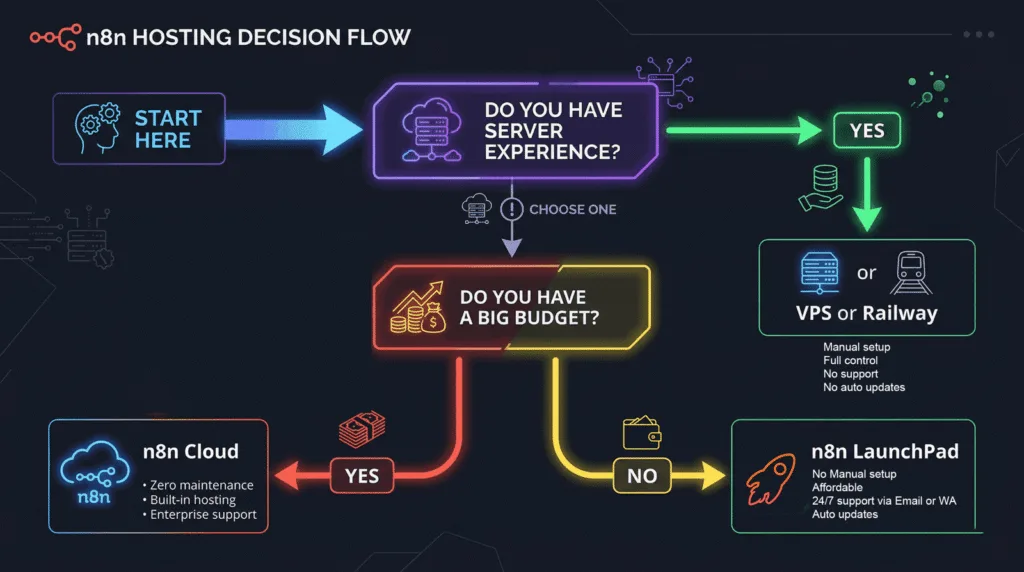
n8n’s self-hosted Community Edition is free and powerful — but it requires Docker knowledge, VPS setup, SSL configuration, reverse proxy setup (Nginx/Caddy), and ongoing maintenance. For developers, this is Tuesday. For everyone else, it’s a wall.
Even n8n Cloud, while much easier, has execution limits that can unexpectedly halt all your workflows mid-billing cycle with zero warning. Hit your cap and everything stops until the next reset. No grace period, no overage option on lower tiers.
This is the #1 reason people evaluate n8n, get excited, start the setup process, hit a blocker, and never actually get their workflows running. The tool is powerful but the path to “it’s actually running” has friction.
(This is exactly the problem n8n LaunchPad was built to solve — more on that shortly.)
The Integration Count Gap vs Zapier
n8n has 1300+ native integrations. Zapier has 7,000+. That’s not a small gap.
For most common business tools — Slack, Gmail, Notion, Airtable, HubSpot, Stripe, Shopify — n8n has native nodes and they work great. But if you’re working with niche, industry-specific software and need a pre-built connector, Zapier is more likely to have it.
That said, n8n’s HTTP Request node lets you call any REST API directly, and you can write custom integrations in JavaScript. So the gap is less of a hard blocker and more of a time investment. You can connect almost anything — you just might have to build it yourself.
The Learning Curve Is Steeper
If you’re coming from Zapier’s “if this then that” simplicity, n8n’s node-based interface looks intimidating at first. The concepts — trigger nodes, action nodes, set nodes, merge nodes, conditional routing — take a bit of time to internalize.
For non-technical users who just want to connect Gmail to Slack and call it done, Zapier is genuinely the faster path. n8n rewards people who invest time in learning it, but that investment is real.
AI Agent Limitations at the Cutting Edge
Even with n8n 2.0’s impressive AI capabilities, it’s worth being honest: for truly complex autonomous agent tasks — long multi-turn reasoning chains, self-directed goal decomposition, real-time dynamic planning — n8n’s agent framework sometimes requires workarounds. Persistent memory works, but complex workflows may still need external databases for reliable long-term context management. It’s not a dealbreaker, but it’s not magic either.
Who Should Actually Use n8n?
Let’s be specific, because “it depends” is a useless answer.
Use n8n if:
- You’re a developer, technical founder, or have access to someone technical on your team
- You’re running more than ~2,000 workflow executions per month (the pricing math favors n8n rapidly)
- Data privacy matters — you can’t have customer data running through third-party servers
- You want to build AI agents, not just trigger-action automations
- You’re building automation as a service or product (unlimited executions on self-hosted = your clients’ usage doesn’t kill your margins)
- You’re a freelancer selling automation services and want maximum capability in your toolkit
Use Zapier if:
- You’re non-technical and need something running in 20 minutes
- You need a very specific niche integration that n8n doesn’t have natively
- Simplicity and zero maintenance overhead are more important than cost or power
Use Make if:
- You’re somewhere in between — you want more visual complexity than Zapier but aren’t ready to self-host
- You’re running moderate workflows without high-frequency triggers
- Budget matters but you still want managed cloud hosting
The Setup Problem — And Why Most People Never Start

Here’s the uncomfortable truth about n8n:
The gap between “this is amazing” and “this is actually running” is where most people fall off.
You discover n8n, watch a few YouTube videos, get hyped about self-hosting for $5/month. Then you open a terminal, realize you need a VPS, install Docker, configure Nginx, set up SSL, debug port forwarding, figure out why the webhook URL isn’t resolving, and eventually close your laptop. Two weeks later you’re back on Zapier paying $100/month.
Or you go with n8n Cloud, hit your execution limit in 10 days because a polling workflow was quietly burning through your quota, watch all your automations stop, and wonder why nobody warned you.
This exact pattern is why we built n8n LaunchPad.
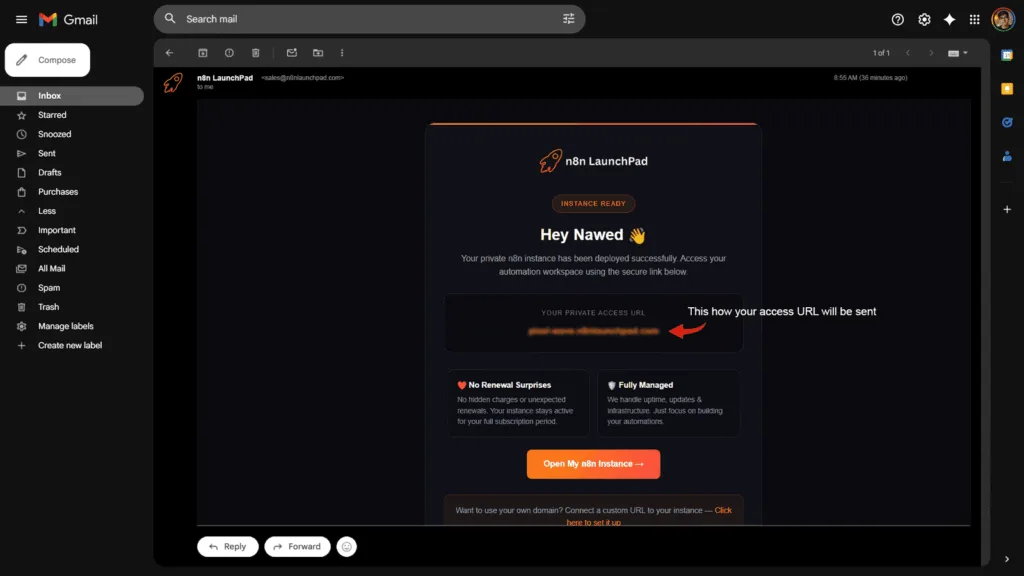
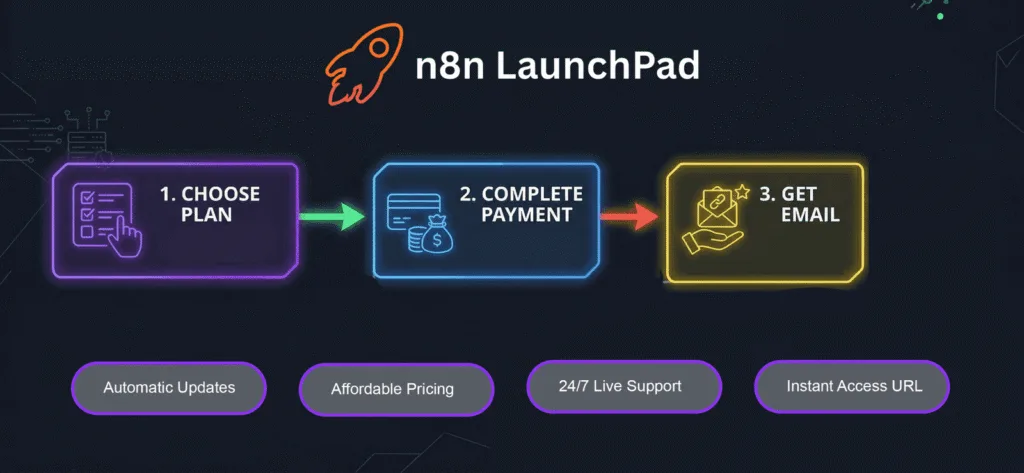
n8n LaunchPad gives you a fully deployed, production-ready n8n instance — pre-configured, SSL secured, running — starting at just $5/month. No Docker. No VPS. No terminal. No config files. You get the login URL, you start building.
It’s the fastest way to go from zero to running automations on n8n, without giving up the power of self-hosted or fighting with cloud execution limits.
Get your n8n instance up in minutes →
Real-World Use Cases Where n8n Wins
Still not sure if n8n is the right call? Here’s where it genuinely crushes the competition in practice.
Automated Lead Qualification + CRM Enrichment
Capture a lead from a web form → enrich their company data via Clearbit or Apollo → score the lead based on firmographic criteria → route high-priority leads to Slack for sales follow-up and low-priority to a nurture email sequence → log everything in HubSpot with enriched notes. A 15-step workflow like this costs 1 execution per run on n8n. On Zapier, that’s 15 tasks per lead.
AI-Powered Customer Support Triage
Incoming support tickets trigger an AI agent that reads the ticket, checks a knowledge base via vector search, generates a suggested response, and either sends it automatically (if confidence is high) or routes to a human with the suggested response pre-filled. n8n 2.0’s agent framework with RAG support makes this buildable without a single line of custom code.
Content Repurposing Pipeline
A new blog post published on WordPress → AI agent extracts key points → generates 5 social media variations (LinkedIn, Twitter/X, Instagram caption, email newsletter snippet, YouTube short script) → queues them in Buffer → sends a preview Slack message for approval. One workflow, one execution per post.
eCommerce Order Operations
New order in WooCommerce → check inventory in real-time → if low stock, auto-create a purchase order to the supplier → send a custom confirmation email with expected delivery date → log in a Google Sheet → notify fulfillment team in Slack. Multi-step, cross-system, completely automated.
Freelancer Automation-as-a-Service
This one’s worth calling out specifically. If you’re a freelancer or agency building automations for clients, n8n self-hosted is a game-changer for your margins. You run one n8n instance, charge clients $200–500/month for their automation maintenance, and your actual infrastructure cost stays under $20/month total. Try doing that math on Zapier where you’re billed per client’s task volume. <!– 📸 IMAGE SUGGESTION #8 — USE CASES VISUAL Placement: After the use cases list, before the FAQ section Prompt: “A clean workflow diagram showing 5 automated use case flows: lead gen, customer support, content creation, ecommerce operations, and freelance services. Each shown as a small icon-based flowchart connected by arrows. White background, colorful node icons, modern flat design. Business automation context.” Alt Text: n8n automation use cases lead generation AI support content ecommerce freelance –>
How n8n Compares on the Stuff That Actually Matters in 2026
By now you’ve seen the full picture. Let me summarize the comparison in the context of where automation is heading.
AI-native workflows are not a bonus feature anymore — they’re becoming table stakes for any automation tool that wants to stay relevant. n8n is the only platform in the Zapier/Make tier that took AI seriously at the architecture level. The 70+ LangChain nodes aren’t just “AI integrations” — they’re primitives for building real agent systems.
Self-hosting and data sovereignty are increasingly important as more businesses process sensitive customer data through automations. n8n is the only major automation tool that gives you a real, production-grade self-hosted option.
Execution-based pricing (whole workflow = 1 execution) versus task-based pricing (each step = 1 task) is a pricing philosophy difference that becomes a massive financial difference at scale. As workflows get more complex, n8n’s model gets relatively cheaper while Zapier’s gets exponentially more expensive.
Community and ecosystem are stronger than ever. n8n has 1,700+ community templates, an active GitHub, a growing Discord, and an ecosystem of hosting providers, educators, and automation builders building around it. The SAP Joule Studio integration announced in 2026 shows enterprise adoption is real, not theoretical.
Frequently Asked Questions
Is n8n really free?
Yes and no. The n8n Community Edition is genuinely free to self-host — full feature access, unlimited workflows, unlimited executions, no license fee. You pay for the server you run it on, which can be as cheap as $3–7/month on a managed VPS or platforms like n8n LaunchPad. n8n Cloud is not free — the free tier was discontinued in 2025, and cloud plans now start around $20/month.
Can n8n replace Zapier completely?
For most use cases, yes. n8n covers the majority of Zapier’s integration catalog through its native nodes and the HTTP Request node. The main exception is very niche, industry-specific integrations where Zapier’s 7,000+ app catalog might have a connector n8n doesn’t. But for any standard business stack — CRMs, email, databases, project management, messaging apps, e-commerce — n8n handles it all.
Do I need to know how to code to use n8n?
Not to get started. n8n’s visual editor is drag-and-drop and most workflows can be built without writing a single line of code. That said, n8n rewards technical users disproportionately — JavaScript and Python nodes unlock capabilities that are simply impossible in pure no-code tools. Many non-technical users learn n8n with community templates and build up from there.
What happened with n8n pricing in 2025–2026?
Several changes: the Cloud free tier was removed, execution counting shifted to “successful executions only” (test runs and failed runs no longer count against your limit), active workflow limits were removed across all plans (you can now have unlimited active workflows on any paid tier), and self-hosted Enterprise introduced tiered licensing for advanced features like SSO and audit logs. The self-hosted Community Edition remained free and unchanged
How does n8n LaunchPad differ from n8n Cloud?
n8n Cloud is n8n’s own managed hosting with execution-based pricing that can get expensive at volume. n8n LaunchPad is an independent managed hosting service that runs your n8n instance on dedicated infrastructure starting at $5–7/month — typically 75–95% cheaper than n8n Cloud — with no execution limits tied to billing. You get the full power of self-hosted n8n without managing servers yourself.
Is n8n suitable for non-technical founders?
With help, yes. On raw n8n Cloud or a fully DIY self-hosted setup, the learning curve is real for non-technical users. But with a platform like n8n LaunchPad handling the infrastructure, and the massive library of community templates to start from, non-technical founders can absolutely build and run useful automations without hiring a developer.
What is n8n 2.0 and why does it matter?
n8n 2.0 launched in January 2026 and was a major architectural upgrade. It shipped native LangChain integration, 70+ AI-specific nodes, persistent agent memory, multi-agent orchestration support, vector database integrations for RAG workflows, and human-in-the-loop execution patterns. Essentially, it transformed n8n from a workflow automation tool into an AI agent orchestration platform. It’s the single biggest reason n8n’s competitive position strengthened significantly heading into 2026.
Can I migrate from Zapier to n8n?
Yes. There’s no one-click migration tool, but the process is straightforward: export your Zapier workflows as documentation, rebuild them in n8n using equivalent nodes, and test. Most Zapier automations are simple enough that rebuilding takes less time than you’d expect. The community has published migration guides for common Zap patterns. The ROI of migration is often positive within the first 2–3 months given the pricing difference.
What are n8n’s biggest limitations in 2026?
The main ones are:
1. The self-hosting setup requires technical knowledge and is a genuine barrier for non-developers
2. The native integration catalog is smaller than Zapier’s at ~1300+ native apps vs 7,000+
3. Very complex autonomous AI agent tasks may require external memory database workarounds
4. n8n Cloud’s execution limits can halt workflows unexpectedly on lower tiers if you’re not monitoring your consumption. None of these are dealbreakers, but they’re worth knowing before you commit.
The Verdict
Is n8n the best automation tool in 2026?
For power, flexibility, AI capabilities, and value at scale — yes, unambiguously.
There’s no other tool in the Zapier/Make category that matches what n8n 2.0 delivers technically. The open-source model, the self-hosting option, the execution-based pricing, and the AI agent capabilities put it in a different weight class from a pure capability standpoint.
But “best” depends on your situation.
If you’re non-technical, need something running today, and need a specific niche integration, Zapier is still faster to get started. If you’re somewhere in between, Make is a reasonable choice. But for anyone who’s going to be running automation seriously — high volume, complex logic, AI workflows, client work — n8n wins on almost every dimension that matters long-term.
The one thing holding people back isn’t capability. It’s setup.
And that’s exactly what we built n8n LaunchPad to solve.
No Docker. No VPS. No config files. No execution cap surprises. Just a fully running n8n instance ready in minutes, starting at $5/month.
If you’ve been wanting to get serious about automation — this is how you actually start.
Written by the n8n LaunchPad team. We help makers, founders, and developers get n8n running without the infrastructure headache — starting at $6/month.