

The Problem Nobody Talks About
You built your first Zap. It worked beautifully. Then your Zapier bill hit $50/month — for automating three things. So you started looking for alternatives.
Now you’re stuck choosing between two options that both promise “affordable automation” but look wildly different under the hood. Pabbly Connect on one side. n8n on the other. Both have passionate fans online. Both claim to be the better deal.
But here’s the truth: they’re built for different types of people. And picking the wrong one will cost you — either in money or in weeks of wasted setup time.
Let’s cut through the noise. And do n8n vs Pabbly Connect
Table of Contents
What Are These Tools, Really?
Pabbly Connect is a cloud-based automation platform — think of it as a Zapier clone, but with a flat lifetime deal pricing model. You connect apps, set triggers and actions, done. No servers, no code, nothing technical.
n8n is a different beast. It’s an open-source workflow automation tool with a visual node-based editor. It’s far more powerful — you can build complex, multi-branch logic, handle webhooks, write custom JavaScript, and even self-host it. But that last part — self-hosting — is where most non-technical users get stuck.
Both tools solve the same core problem: connecting your apps and automating repetitive tasks. But the ceiling of what they can do? Miles apart.
Head-to-Head: Pricing
This is usually where Pabbly wins the first impression. But let’s look at the full picture.
| Feature | Pabbly Connect | n8n Cloud | n8n (Self-Hosted) |
|---|---|---|---|
| Starting Price | ~$25/month (or ~$249 lifetime) | $20/month (Starter) | Free (hosting costs apply) |
| Task/Operation Limits | Unlimited tasks ✅ | 2,500 executions/month | Unlimited ✅ |
| Workflows/Automations | Unlimited | Limited on Starter | Unlimited ✅ |
| Custom Code Support | ❌ No | ✅ Yes | ✅ Yes |
| Self-Hosting Option | ❌ No | ❌ No | ✅ Yes |
| Complexity of Setup | Very Easy | Easy | Hard (VPS, Docker, etc.) |
| App Integrations | 1,000+ | 400+ native, unlimited via API | 400+ native, unlimited via API |
| Webhook Support | Basic | Advanced | Advanced |
| Free Plan | ❌ No | ❌ No | ✅ (Self-hosted only) |
Flexibility: Where n8n Completely Wins
If you ever outgrow basic “if this, then that” logic, Pabbly hits a wall fast.
n8n lets you build workflows that would make Zapier cry. Think about things like:
- Conditional branching — different paths based on data values
- Loop nodes — process 500 rows from a spreadsheet, one by one
- Custom JavaScript — transform data exactly how you need
- Webhooks as triggers — catch real-time data from any source
- AI integration — connect directly to OpenAI, Claude, or any LLM API
- Database operations — read/write from PostgreSQL, MySQL, MongoDB
Pabbly handles linear workflows well. n8n handles everything.
This is why developers, agencies, and serious no-code builders prefer n8n — even if the setup is harder.
The Catch: n8n’s Self-Hosting Problem
Here’s where most people get burned.
n8n is open-source and free to self-host. That sounds amazing. You spin up a $5/month VPS on DigitalOcean, follow a 45-minute Docker tutorial, hit three errors, Google them, fix two, break one new thing, and three hours later you’re not sure if it’s actually running.
This isn’t an exaggeration. r/n8n is full of threads exactly like this.
The technical requirements to self-host n8n properly:
- A Linux VPS (DigitalOcean, Hetzner, Hostinger, etc.)
- Docker + Docker Compose installed
- Nginx reverse proxy configured
- SSL certificate via Let’s Encrypt
- Domain pointed to your server
- Environment variables correctly set
- Backups configured
- And at time of updating n8n
For a developer? That’s Tuesday morning. For a freelancer or small business owner? That’s a project that kills your weekend and still might not work.
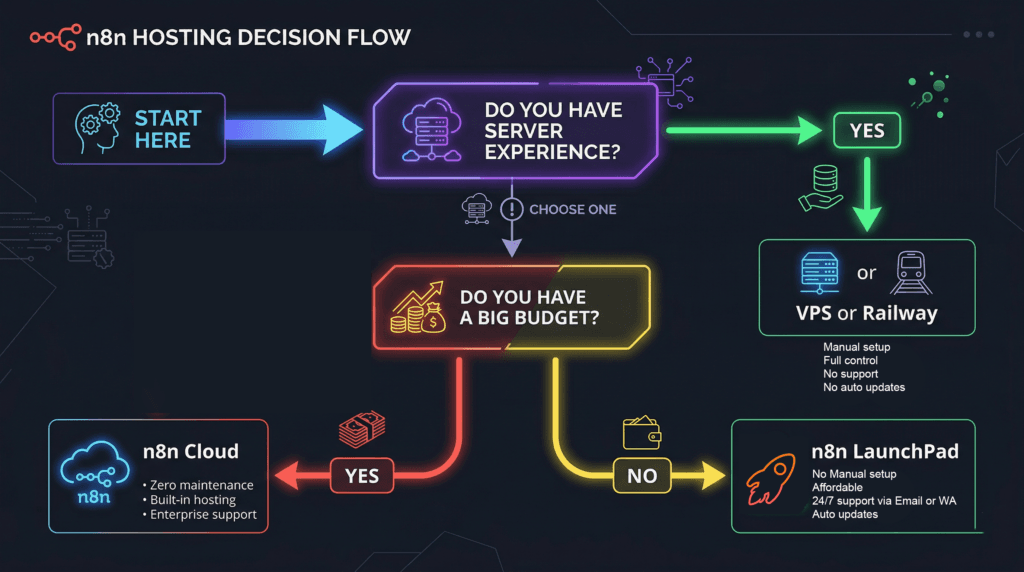
So Who Should Pick What?
Choose Pabbly Connect if:
- You need simple, linear automations (form → email → CRM)
- You want a one-time payment and zero maintenance
- You don’t need custom logic, code, or advanced webhooks
- You’re automating marketing/sales ops, not complex data pipelines
Choose n8n if:
- You need complex multi-step workflows with conditional logic
- You want to integrate AI, databases, or custom APIs
- You’re building automations for clients or at scale
- You’re okay investing time in setup — or you find a way around it
This Is Where n8n LaunchPad Comes In
If you’ve decided n8n is the right tool but the self-hosting setup sounds like a nightmare — there’s a middle path.
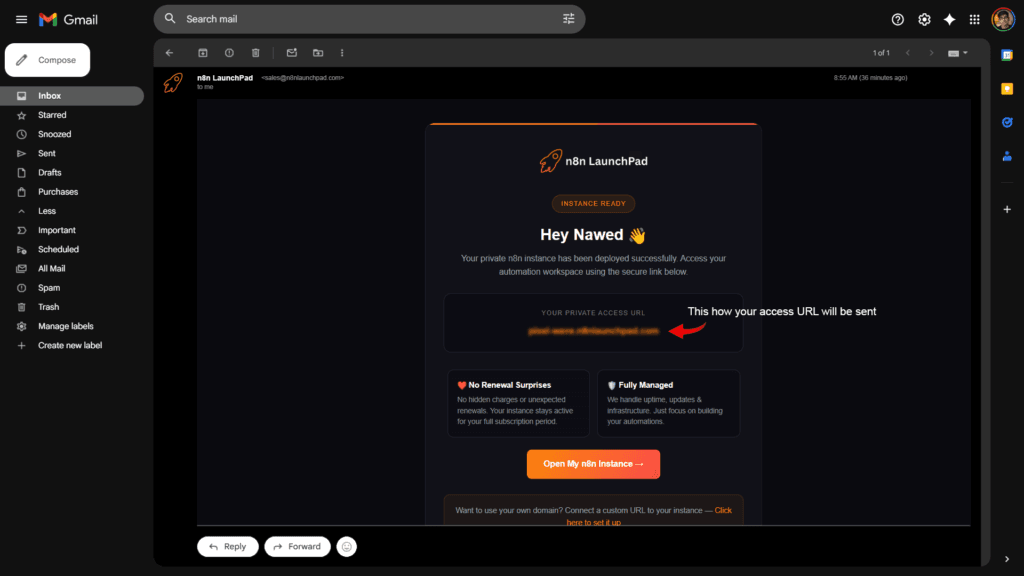
n8n LaunchPad handles all the technical setup for you. No VPS. No Docker. No terminal commands. You sign up, and within minutes, a fully functional n8n instance is deployed and ready — your access URL lands straight in your inbox.
You get all the power of n8n — the complex workflows, the AI integrations, the unlimited flexibility — without spending a single hour on server configuration.
It’s the ideal option for freelancers and small business owners who chose n8n for its power but want to skip the DevOps degree.
Think of it as the difference between buying a car and building one from scratch. Same destination. Very different journeys.
Frequently Asked Questions
Is n8n really free if I self-host it?
The software itself is free, yes. But you’ll pay for a VPS ($5–$20/month depending on provider), and you’ll spend significant time on setup and maintenance. For many non-technical users, that hidden cost makes it not-free in practice.
Does Pabbly Connect have unlimited tasks?
Yes — Pabbly advertises unlimited tasks on all plans. However, “tasks” in Pabbly are counted differently than in Zapier, and there are fair-use considerations. For most small business use cases, it genuinely is unlimited.
Can n8n replace Pabbly Connect completely?
For most workflows, yes. n8n can do everything Pabbly can do — and far more. The only reason to stick with Pabbly is simplicity and the lifetime deal pricing.
Is n8n LaunchPad suitable for beginners?
Yes. That’s exactly the point. You don’t need any technical knowledge. You get a pre-configured n8n instance ready to use. If you know how to use Zapier, you can use n8n on n8n LaunchPad.
What happens if n8n updates — do I need to do anything on LaunchPad?
No. Updates and infrastructure are handled for you. You just use the tool.
The Bottom Line
Pabbly Connect is excellent if you want simple automations at a low, predictable cost. The lifetime deal is genuinely hard to argue with for basic use cases.
But if you want real automation power — the kind that can handle complex logic, AI workflows, and custom data operations — n8n is in a completely different league. The only barrier is setup.
And that barrier? It’s not necessary anymore.
Ready to Run n8n Without Touching a Server?
No VPS. No Docker. No config files. Just automation. Your access URL will be in your inbox in minutes.