


Table of Contents
The Real Question Nobody Asks Before Picking an Automation Tool
You’ve outgrown Zapier. The pricing hurt, the task limits were frustrating, and someone in a Facebook group said “just use n8n or Make.” So now you’re here — staring at two tools, both promising to automate your entire business, and you have no idea which one to actually pick.
Here’s the thing: most comparison articles tell you both tools are “great for different use cases.” That’s not helpful. You need a real breakdown — what each tool actually does, where it falls short, and which one makes more sense for you right now.
Let’s get into it.
Background: What Are n8n and Make?
Both n8n and Make.com are workflow automation platforms that let you connect apps and automate tasks without writing code (mostly). But they come from very different philosophies.
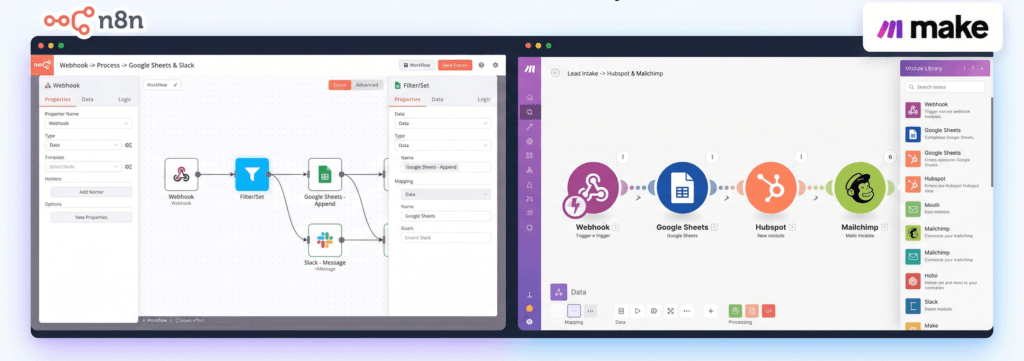
Make.com (formerly Integromat) is a visual, cloud-based automation platform. It’s polished, beginner-friendly, and built around a drag-and-drop “scenario” builder. It’s been around since 2012 and has a strong reputation in the no-code space.
n8n is newer, open-source, and built for people who want real flexibility. It launched in 2019 and quickly became a favourite among developers and advanced automators. The big selling point? You can self-host it — meaning you own your data and aren’t locked into someone else’s pricing model.
Both have free tiers. Both can connect hundreds of apps. But the similarities stop there pretty quickly.
n8n vs Make: Feature-by-Feature Comparison
| Feature | n8n | Make.com |
|---|---|---|
| Pricing Model | Based on workflow executions | Based on operations (each action = 1 op) |
| Free Plan | Yes (self-hosted or cloud trial) | Yes (1,000 ops/month) |
| Starting Paid Plan | ~$20/month (cloud) | $9/month (10,000 ops) |
| Self-Hosting | ✅ Yes (Docker, VPS, etc.) | ❌ No |
| Open Source | ✅ Yes | ❌ No |
| Visual Builder | ✅ Node-based canvas | ✅ Circular scenario builder |
| Beginner Friendliness | Moderate (steeper curve) | High (very intuitive) |
| Custom Code (JS/Python) | ✅ Full support | ⚠️ Limited |
| Webhooks | ✅ Advanced | ✅ Basic–Moderate |
| Error Handling | ✅ Robust | ⚠️ Limited |
| Data Transformation | ✅ Powerful (expressions, code) | ⚠️ Moderate |
| Native Integrations | 400+ | 1,500+ |
| Community Templates | Growing | Large library |
| GDPR / Data Privacy | ✅ Full control (self-hosted) | ⚠️ Data goes through their servers |
| AI/LLM Nodes | ✅ LangChain built-in | ⚠️ Basic AI support |
| White Labelling | ✅ Possible | ❌ No |
Where Make.com Genuinely Wins
Let’s be fair — Make isn’t popular for no reason.
1. Easier to learn from day one. The visual flow in Make is almost game-like. Modules connect in a circular flow and the interface tells you exactly what’s happening at each step. If you’ve never automated anything before, Make will feel approachable.
2. More native integrations. With 1,500+ built-in app connections, there’s a good chance Make already has a module for the tool you’re using — no custom API calls needed.
3. Better for simple, transactional workflows. Things like “when a Google Form is submitted, add to Airtable and send an email” — Make handles these effortlessly and the setup takes under 10 minutes.
3. Predictable low-cost entry. At $9/month for 10,000 operations, Make is genuinely affordable for light users.
Where n8n Actually Has the Edge
Here’s where it gets interesting — and why a lot of power users eventually migrate to n8n.
1. You’re not renting your automations. On Make, every action counts as an “operation.” A workflow with 5 steps running 1,000 times = 5,000 operations. On n8n cloud, you’re charged per execution, not per step. That’s a fundamentally better model for complex workflows.
2. AI automation is first-class. n8n has native LangChain nodes, meaning you can build actual AI agents — not just call an OpenAI API. If you’re building anything with AI (and you should be), n8n is miles ahead.
3. Custom code, when you need it. n8n lets you drop in JavaScript or Python directly inside your workflow. Make technically has a “tools” module for this, but it’s far more limited. Complex logic that would require 10 Make modules might need only 1 n8n code node.
4. Data privacy. If your workflows touch customer data, payment info, or anything sensitive — n8n’s self-hosting option means your data stays on your server. Make processes everything through their cloud.
5. Open source = no vendor lock-in. n8n’s codebase is public. If the company disappeared tomorrow, you could still run it. With Make, you’re fully dependent on their continued operation.
The Catch With n8n Self-Hosting

Here’s the honest part nobody in the n8n community likes to say out loud: self-hosting n8n is not beginner-friendly.
You need a VPS (Providers like Contabo or Hostinger), Docker installed, a working knowledge of SSH, reverse proxies, SSL certificates, and enough patience to spend 4–6 hours setting it up — and more hours debugging when something breaks.
For freelancers and small business owners who just want workflows running — not a server management side hobby — this is a real barrier. And it’s exactly why many people end up back on Make or Zapier, despite the pricing.
There’s a Middle Path: n8n Without the Server Headache
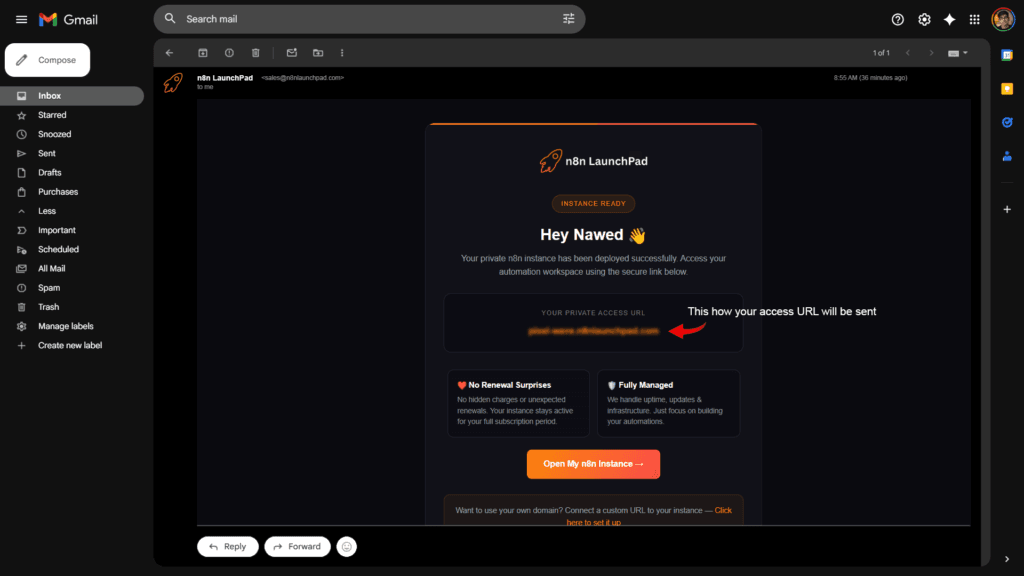
If you want n8n’s power without the self-hosting complexity, n8n LaunchPad bridges that gap. It’s a managed platform that gives you a fully deployed n8n instance — no VPS, no Docker, no command line. You sign up, and your access URL lands in your inbox. That’s it.
You get all of n8n’s features — the AI nodes, the code execution, the custom integrations — without touching a single server configuration. It’s built specifically for the people who want n8n’s power but Make’s simplicity of getting started.
If you’ve been on the fence about trying n8n because the setup felt overwhelming, this removes that excuse entirely.
So Which Tool Should You Actually Pick?
Here’s a simple decision framework:
Pick Make.com if:
- You’re just starting with automation
- Your workflows are simple (connect two apps, trigger on event)
- You want the most app integrations out of the box
- Budget is under $20/month
Pick n8n if:
- You run complex workflows with multiple logic branches
- You want to build AI-powered automation
- Data privacy matters to your business
- You’re willing to invest slightly more time upfront for long-term flexibility
- You need custom code inside your workflows
Pick n8n via n8n LaunchPad if:
- You want n8n but don’t want to manage servers
- You want to get started in minutes, not hours
- You’re a freelancer or small business owner who values time over tinkering
Frequently Asked Questions
Is n8n really free?
Yes — if you self-host it. The cloud version has a free trial but requires a paid plan for ongoing use. Managed platforms like n8n LaunchPad offer affordable plans that remove the self-hosting requirement entirely.
Can Make replace Zapier completely?
For most users, yes. Make is more flexible and significantly cheaper than Zapier at comparable usage levels. However, n8n beats both once your workflows get complex.
Does n8n work with all the same apps as Make?
Not quite — Make has more native integrations (1,500+) vs n8n’s 400+. But n8n’s HTTP Request node lets you connect to virtually any API, so the gap is often smaller than the numbers suggest.
Is n8n good for non-technical users?
It can be, especially when you’re not dealing with server setup. The workflow builder itself is learnable. Tools like n8n LaunchPad help by eliminating the technical onboarding entirely.
Which is better for AI automation?
n8n — without question. The built-in LangChain integration makes n8n the go-to choice for building AI agents, chatbots, and LLM-powered workflows.
Bottom Line
Make.com is easier to start with. n8n is more powerful to grow with.
If you’re still on Zapier wondering where to go next — Make is the safe sideways move. n8n is the upgrade that actually scales with you.
The only real reason people don’t switch to n8n is the setup barrier. And in 2025, that barrier no longer has to exist.
Ready to Try n8n Without the Server Setup?
No Docker. No VPS. No confusing terminal commands. Just your automation URL, ready in minutes.