

Quick Verdict: n8n Cloud is a solid platform built on top of genuinely powerful automation software. But the execution-based pricing model has a nasty ceiling — one that surprises most users within their first few weeks. If you’re running more than a handful of workflows, you’ll hit the wall faster than expected. Let’s dive deep into n8n Cloud Review.
Table of Contents
What Is n8n?
If you’ve spent any time in the automation space, you’ve probably come across n8n. It’s a workflow automation tool — open-source, self-hostable, and genuinely powerful. Think Zapier, but without the per-task pricing that slowly bleeds your wallet dry as your business grows.
The core idea is simple: you connect apps and services together using a visual node-based editor. Gmail triggers a workflow, which pulls data from a Google Sheet, transforms it, and posts a message to Slack. That kind of thing. Except n8n can handle stuff that would make Zapier break a sweat — multi-step AI agents, JavaScript/Python code nodes, API calls, conditional branching, and sub-workflows.
As of 2026, n8n has crossed 160,000+ GitHub stars and has a genuinely large community of developers and founders who build complex automation on it daily. It’s not a toy. It’s serious infrastructure.
But here’s the fork in the road: you either self-host it on your own server, or you use n8n Cloud — their managed SaaS offering where they handle the infrastructure for you.
This review is specifically about n8n Cloud — what you get, what you’re giving up, where the traps are, and whether it’s actually worth paying for.
n8n Cloud vs Self-Hosted — The Core Difference

Before we get into pricing and features, you need to understand the fundamental difference between these two options, because the whole review hinges on it.
n8n Community Edition (Self-Hosted):
- Completely free to use
- No execution limits — your workflows run as many times as you want
- No workflow limits
- You’re responsible for the server, updates, SSL, backups
- Runs on any VPS, cloud server, or even a Raspberry Pi
- Hosting costs you roughly $5–$20/month depending on your provider
n8n Cloud:
- Managed by n8n’s team — zero server setup
- Execution limits tied to your plan
- Automatic updates, backups, and SSL handled
- Support is included
- Starts at around $24/month (Starter plan)
The self-hosted version is free software. n8n Cloud is a paid managed service built on top of that free software. You’re paying for convenience, reliability, and support — not for the software itself.
That distinction matters a lot when you’re evaluating whether n8n Cloud is “worth it.”
n8n Cloud Pricing Plans (2026)
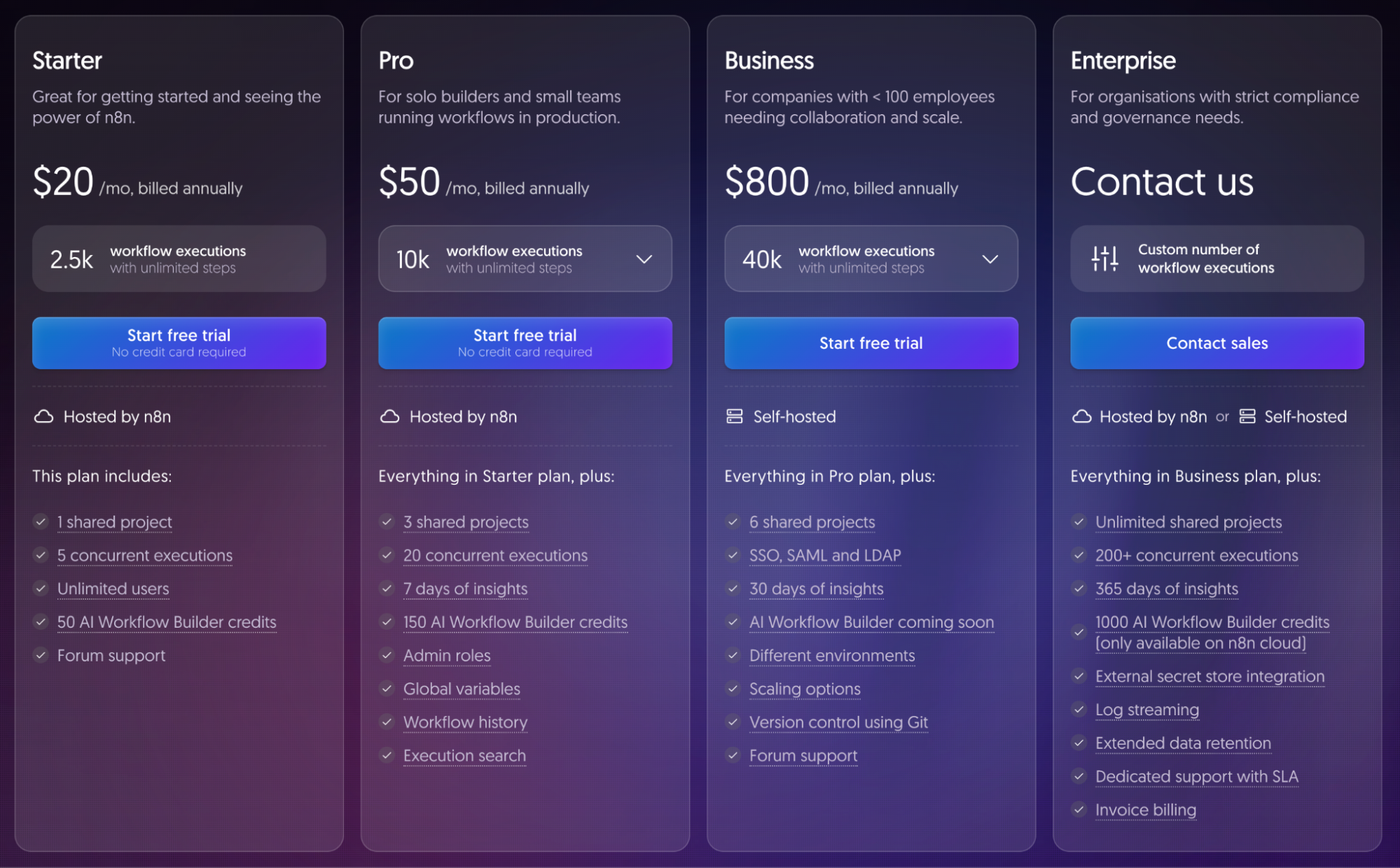
n8n updated its pricing in 2025, shifting entirely to execution-based billing and removing the old per-workflow caps. Here’s what the plans look like now:
| Plan | Monthly Price | Executions/Month | Concurrent Workflows |
|---|---|---|---|
| Starter | ~$24/mo | 2,500 | 5 concurrent |
| Pro | ~$60/mo | 10,000 | 20 concurrent |
| Business | ~$800/mo | 40,000 | Unlimited |
| Enterprise | Custom | Custom | Custom |
A few things worth noting:
Annual billing saves 17%. If you commit to a yearly plan, the per-month cost drops. n8n defaults to showing annual prices, so make sure you check what the monthly rate actually is if you want flexibility.
No free plan. n8n discontinued its permanent free cloud tier. They offer a 14-day trial, but there’s no free Cloud option anymore. The only genuinely free version is the self-hosted Community Edition.
Pricing is in euros for European customers. For non-European users, expect dollar pricing that roughly tracks the EUR amounts. This caused some confusion when pricing shifted in 2025, so worth being aware of.
What changed in 2025:
- Active workflow limits were removed. Previously, lower plans restricted how many workflows could be active at once. Now every plan has unlimited active workflows.
- Pricing shifted to euros with a modest increase (Starter: $20 → ~€24/month equivalent).
- The old free tier was discontinued.
- Execution counting changed — failed test runs no longer count against your limit, which is genuinely more fair.
On paper, removing workflow limits sounds like a big improvement. And it is. But the execution limits are where things get complicated.
The Execution Limit Problem — The Real Trap
This is the section most n8n Cloud reviews skim over. I’m not going to do that, because this is genuinely the most important thing to understand before you sign up.
What counts as an execution?
Every time a workflow runs from start to finish, that counts as one execution. It doesn’t matter how many steps are in the workflow — a 20-step workflow costs the same as a 2-step workflow in terms of execution count. That’s actually a good thing, and one of n8n’s pricing advantages over tools like Zapier, which charge per step.
Where it gets ugly:
The Starter plan gives you 2,500 executions per month. That sounds like a lot until you do the math.
Let’s say you have a polling workflow that checks your Gmail inbox every 15 minutes looking for new emails. That workflow alone runs 96 times per day. Over 30 days? That’s 2,880 executions — and you’ve already exceeded the Starter plan’s entire monthly allowance with a single workflow.
Here’s a realistic example of what 6 basic business workflows look like on the Starter plan:
| Workflow | Frequency | Monthly Executions |
|---|---|---|
| Gmail inbox polling (every 15 min) | Every 15 min | 2,880 |
| Server health check | Every hour | 720 |
| Daily report generation | Daily | 30 |
| Lead form → CRM sync | 50 leads/day | 1,500 |
| Slack digest | Every 2 hours | 360 |
| E-commerce order notifications | 30 orders/day | 900 |
| Total | 6,390 |
You’re at 2.5x the Starter plan limit with just six modest workflows. You’d need the Pro plan ($60/month) at minimum.
And here’s the harshest part: When you hit your execution cap, n8n Cloud doesn’t warn you gracefully and queue your workflows. Everything stops. Workflows halt until the next billing cycle resets. No overage option. No grace period.
This is, by far, the most common complaint from n8n Cloud users in 2026 — and the reason so many teams end up looking for alternatives within their first few months.
n8n Cloud Features — What You Actually Get
Let’s set the pricing frustration aside for a second, because the actual feature set of n8n — cloud or self-hosted — is genuinely impressive.
1300+ Native Integrations
n8n has over 1300+ native app integrations covering everything from Google Workspace and Slack to Airtable, HubSpot, Notion, Stripe, PostgreSQL, and custom APIs. For the vast majority of automation use cases, you won’t need to build anything from scratch.
If a native integration doesn’t exist, the HTTP Request node handles almost anything with a REST API, and you can write custom nodes in JavaScript.
Code Nodes (JavaScript + Python)
This is where n8n separates itself from Zapier and most other visual automation tools. When the visual logic runs out of road, you drop into a code node and write actual JavaScript or Python. This unlocks things like:
- Custom data transformations
- Complex conditional logic
- API calls with non-standard authentication
- Math, string manipulation, and data parsing
For technical users, this is a game-changer.
AI Agent Workflows
n8n has first-class support for building AI agent workflows using a LangChain-powered node system. As of 2026, you can build multi-step autonomous agents with:
- Tool-calling capabilities (the agent can trigger other workflows, search the web, query databases)
- Memory nodes for context-aware conversations
- Support for OpenAI, Anthropic Claude, Google Gemini, Mistral, and local models via Ollama
- Sub-workflow chaining for modular agent architecture
This is a legitimate differentiator. Zapier’s AI features are surface-level by comparison. n8n’s agent system is designed for teams that want to build production-grade AI automation.
Sub-Workflows and Modularity
You can break complex automation into reusable sub-workflows and call them from parent workflows. This is huge for maintainability — instead of one massive 40-node spaghetti workflow, you build clean, modular components.
Workflow Templates
The community has published 500+ workflow templates covering common use cases — CRM automation, lead generation, content pipelines, DevOps alerts, e-commerce workflows, and more. On n8n Cloud, you can import and deploy these in minutes.
Version History and Error Handling
n8n Cloud includes workflow version history, so you can roll back if something breaks. Error handling is built into the workflow editor — you can set fallback paths when a node fails, which is critical for any production automation.
Shared Projects and Team Collaboration
Even on the Starter plan, you get shared project spaces so teams can collaborate on workflows. This is useful if you’re building automation alongside a team rather than working solo.
Performance and Reliability
For most users, n8n Cloud runs reliably. The infrastructure is managed by n8n’s team, and uptime is generally solid for a SaaS product.
That said, there are a few performance caveats worth knowing:
Large dataset processing can get slow on Cloud. If you’re processing thousands of rows of data in a single workflow execution, n8n Cloud can feel sluggish compared to a self-hosted instance on dedicated hardware. For most small-to-medium automation needs, this isn’t a problem. For heavy data pipelines, it can be.
Execution queue. On the Starter plan, you have 5 concurrent workflow executions. On Pro, 20. If multiple workflows trigger at the same time and you’re near the concurrent limit, some executions will queue up. For real-time automation (webhook-triggered, time-sensitive), this can cause delays.
Webhook response times. Trigger latency on n8n Cloud is generally fast, though users running high-frequency webhooks on busy plans have occasionally reported inconsistencies. Self-hosted instances on dedicated VPS tend to have more predictable latency.
UI and Ease of Use
The n8n editor is a canvas-based drag-and-drop interface. You add nodes, connect them with lines, configure each node’s settings, and run the workflow. It’s intuitive once you get the mental model.
For people coming from Zapier: There’s a learning curve. Zapier abstracts everything into “Trigger → Action → Action” steps. n8n gives you full control, which means more complexity. You’re setting up data mapping with expressions, writing conditions using n8n’s expression syntax, and managing error branches. It’s not hard, but it’s not as hand-holdy as Zapier.
For developers: n8n’s UI is genuinely pleasant to work in. The node editor is clean, the code nodes have syntax highlighting, and the execution debug view shows you exactly what data passed through each node. The debugging experience alone is miles ahead of most no-code tools.
The expression syntax takes some getting used to. n8n uses {{ $json.fieldName }} style expressions for referencing data from previous nodes. Once you know it, it’s fast. Before you know it, it feels like learning a new language.
Mobile: There’s no dedicated mobile app. n8n Cloud works in a mobile browser but isn’t designed for mobile editing. Don’t expect to build workflows on your phone.
n8n Cloud vs Zapier vs Make.com — Honest Comparison
Here’s a straightforward comparison of the three most common automation tools people evaluate together:
| n8n Cloud | Zapier | Make.com | |
|---|---|---|---|
| Pricing model | Per execution (per workflow run) | Per task (per step) | Per operation |
| Starter price | ~$24/mo | ~$20/mo (2,000 tasks) | Free (1,000 ops) |
| Self-hostable | ✅ Yes (free) | ❌ No | ❌ No |
| AI agent support | ✅ First-class | ⚠️ Basic | ⚠️ Limited |
| Code nodes | ✅ JS + Python | ❌ No | ❌ No |
| Native integrations | 400+ | 7,000+ | 2,000+ |
| Learning curve | Medium-High | Low | Medium |
| Data stays with you | ✅ (self-hosted) | ❌ Always SaaS | ❌ Always SaaS |
| Complex workflows | ✅ Excellent | ⚠️ Gets expensive | ✅ Good |
| At-scale cost | 75–80% cheaper than Zapier | Expensive at scale | Moderate |
The honest take:
Zapier wins on integration count (7,000+ apps) and simplicity. If you have simple automations and don’t mind paying per step, it’s the path of least resistance. But the per-task model becomes brutally expensive as your automations grow in complexity.
Make.com is a solid middle ground — more flexible than Zapier, decent pricing, good visual builder. But it doesn’t offer self-hosting and the AI capabilities are surface-level compared to n8n.
n8n is the power user’s choice. The execution-based pricing (pay per workflow run, not per step) means complex multi-step workflows cost the same as simple ones. The AI agent capabilities are genuinely more advanced. And the self-hosted option means you can escape the cloud pricing altogether.
The catch, as covered above, is that n8n Cloud’s execution limits can surprise you. A 10-step AI workflow that runs 100 times a day on n8n Cloud is very manageable. That same workflow on Zapier would cost you for every single step — at 10 steps × 100 runs × 30 days = 30,000 tasks per month, you’d be looking at $100+ on Zapier’s mid-tier plan.
Who Should Use n8n Cloud?
n8n Cloud makes sense for a specific type of user. Let’s be direct about who that is.
n8n Cloud is a good fit if:
- You want to get started with n8n quickly without touching a server
- You’re building relatively low-volume automation (under 2,500–5,000 executions/month)
- You’re on a team that needs a shared workspace with support from n8n
- You’re prototyping or testing automation before committing to infrastructure
- You need the official n8n support line for troubleshooting
- You value knowing that updates, SSL, and backups are handled automatically
n8n Cloud is probably NOT the right fit if:
- You’re running polling-based workflows that trigger frequently (every 5–15 minutes)
- Your workflow execution count regularly exceeds 2,500–10,000/month
- You’re cost-sensitive and willing to manage a simple server
- You’re building AI agent pipelines that run at any real volume
- You’re handling sensitive or regulated data and want it entirely on your infrastructure
- You’re scaling fast and the jump from $60/mo to $800/mo feels like a cliff
The Alternative: Managed n8n Hosting
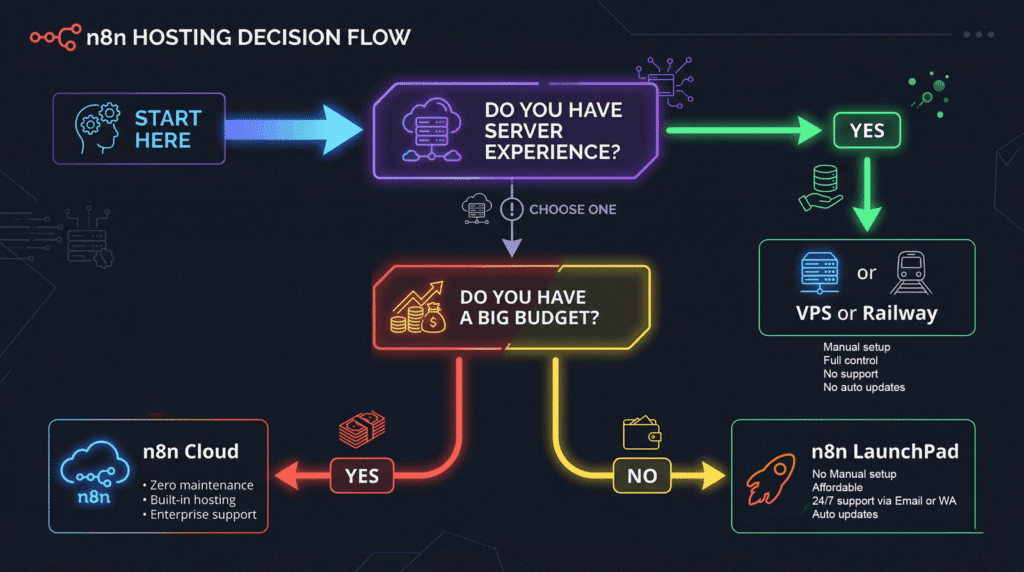
Here’s something most n8n Cloud reviews don’t cover honestly: there’s a third option that most people overlook.
Managed n8n hosting — where someone else sets up and maintains a self-hosted n8n instance for you, on a server that’s yours — gives you the best of both worlds:
- No execution limits. Run as many workflows as you want. A polling workflow checking your inbox every minute? No problem.
- Your data stays on your server. No SaaS middleman.
- Someone else handles setup and maintenance. You don’t need to know what Docker is.
- A fraction of the cost. Managed n8n instances start at $6–$8/month — compared to $24–$60/month on n8n Cloud.
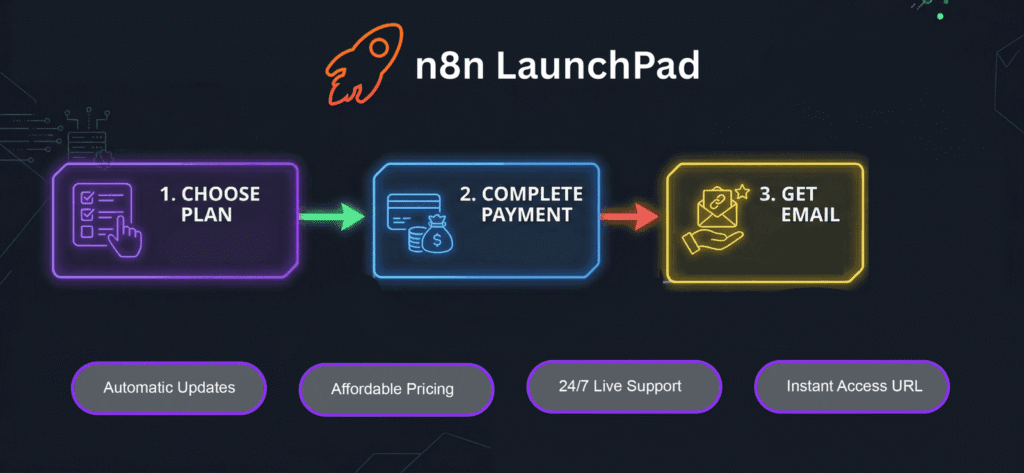
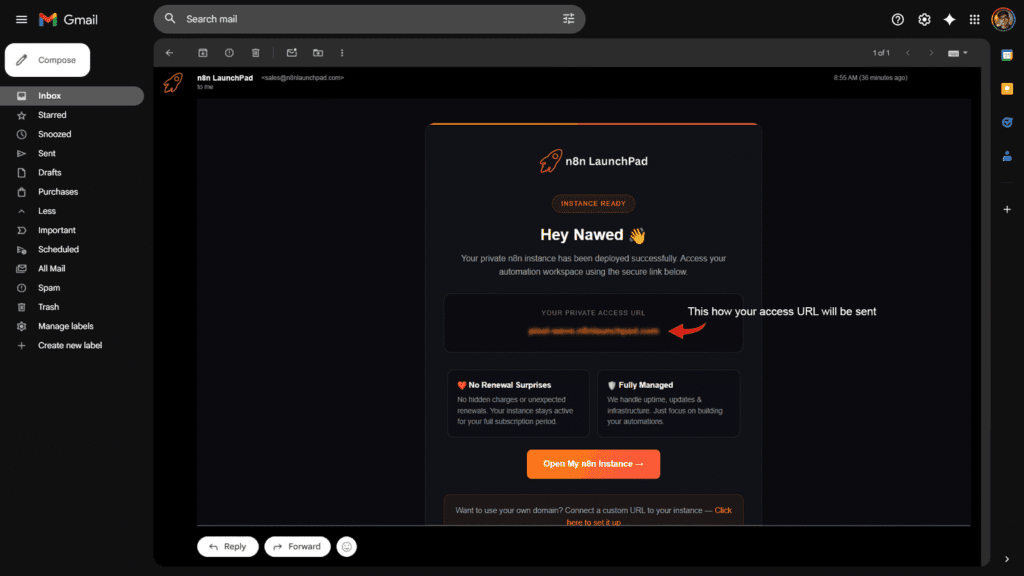
This is exactly what n8n LaunchPad provides: pre-deployed, fully managed n8n instances starting at $6/month, with unlimited executions, no workflow caps, and no surprise billing when your automation grows.
If you’ve been running the numbers above and realizing that n8n Cloud is going to cost you $60–$800/month once your workflows scale, managed hosting is worth looking at seriously before you commit.
Final Verdict
n8n Cloud is a genuinely well-built product sitting on top of genuinely powerful automation software. The platform itself — the visual editor, the AI agent capabilities, the code nodes, the 400+ integrations — is excellent. If you’re evaluating automation tools and technical depth matters to you, n8n is hard to beat on features.
But n8n Cloud’s execution-based pricing has a ceiling that catches most people off guard. The Starter plan’s 2,500 executions evaporate fast once you’re running real-world, high-frequency automation. The jump from $24/month to $60/month is manageable. The jump from $60/month to $800/month is brutal.
My honest rating:
| Category | Score |
|---|---|
| Core platform capability | ⭐⭐⭐⭐⭐ (5/5) |
| UI and ease of use | ⭐⭐⭐⭐ (4/5) |
| Pricing value | ⭐⭐⭐ (3/5) |
| Execution limits transparency | ⭐⭐ (2/5) |
| AI agent capability | ⭐⭐⭐⭐⭐ (5/5) |
| Customer support | ⭐⭐⭐⭐ (4/5) |
| Overall | ⭐⭐⭐⭐ (4/5) |
Bottom line: If you’re just starting out with automation and want zero infrastructure overhead, the n8n Cloud trial is the right place to start. Build your first few workflows, get familiar with the platform, and validate whether n8n’s approach fits your use case.
But once you know you’re staying with n8n and your workflows are growing — especially if you’re running polling-based automations or building AI agent pipelines — you’ll save significant money by moving to a managed self-hosted setup before n8n Cloud’s execution ceiling starts costing you.
Frequently Asked Questions
Is n8n Cloud free?
No. n8n Cloud does not have a free tier as of 2026. They removed the permanent free plan in 2025. n8n does offer a 14-day trial so you can test the platform before paying. The only genuinely free version of n8n is the self-hosted Community Edition, which has no execution limits and costs nothing to license — you just pay for the server you run it on.
How much does n8n Cloud cost per month?
n8n Cloud starts at approximately $24/month (Starter, 2,500 executions), $60/month (Pro, 10,000 executions), and $800/month (Business, 40,000 executions). Annual billing saves about 17% compared to month-to-month. Enterprise pricing is custom.
What happens when I hit my n8n Cloud execution limit?
n8n Cloud stops all your workflows when you hit the monthly execution cap. There’s no warning before you hit it, no overage pricing, and no grace period. Everything halts until your next billing cycle resets. This is the most common surprise for new n8n Cloud users.
Is n8n Cloud better than Zapier?
It depends on your use case. Zapier has more native integrations (7,000+) and is easier to set up for simple workflows. n8n Cloud is better for complex, multi-step automation because it charges per workflow run (not per step), has native code nodes for custom logic, and has significantly more advanced AI agent capabilities. For high-volume or complex automation, n8n Cloud is typically 75–80% cheaper than Zapier.
Can I switch from n8n Cloud to self-hosted?
Yes. n8n supports exporting and importing workflows between accounts. You can move your workflows from Cloud to a self-hosted instance — though you’ll need to reconnect your credentials and integrations after the move.
What’s the difference between n8n Cloud and self-hosted n8n?
n8n Cloud is a managed SaaS service — n8n’s team handles the server, updates, and maintenance for you, but you have execution limits and pay monthly. Self-hosted n8n is the same software running on your own server — you handle the infrastructure, but there are no execution limits and the software itself is free. Self-hosting typically costs $5–$20/month in server fees vs $24–$800/month on Cloud.
Does n8n Cloud have AI workflow capabilities?
Yes. n8n has built first-class AI agent support into the platform, including LangChain-based multi-step agents, memory nodes, tool-calling, and integration with OpenAI, Anthropic Claude, Google Gemini, Mistral, and local models via Ollama. These AI features are available on both Cloud and self-hosted versions.
Is n8n Cloud good for beginners?
n8n Cloud removes the server setup complexity, which helps beginners. But n8n itself has a steeper learning curve than tools like Zapier. If you’re just starting with automation, expect a few hours to get comfortable with the interface, expressions, and data mapping concepts. The 14-day trial is a good way to test whether it clicks for you.
What is a managed n8n hosting alternative?
Managed n8n hosting services — like n8n LaunchPad — give you a pre-deployed n8n instance on a dedicated server, handled by someone else, starting at $6–$8/month. You get no execution limits (unlike n8n Cloud), your data stays on your own server, and you don’t need to manage any infrastructure. It’s a good middle ground for users who want cloud-like convenience without cloud-like pricing.
Does n8n Cloud support multiple users and team collaboration?
Yes. n8n Cloud supports shared project workspaces so teams can collaborate on workflows. Even the Starter plan includes at least one shared project. User and permission management is available on higher tiers.
Last updated: June 2026. Pricing and plan details are accurate as of the date of publication. Always verify current pricing on n8n.io/pricing before making a decision.
About the Author: Published by the n8n LaunchPad team — we run managed n8n instances for founders, agencies, and businesses who want the power of n8n without the server headache.