

Quick Answer: If cost, control, and workflow complexity matter to you — n8n wins. If you need the fastest no-setup option with 6,000+ integrations and don’t mind paying for it — Zapier is still a solid pick. This post breaks down exactly why.
If you’ve spent any time in the automation world, you’ve probably heard both names — n8n and Zapier. They both let you connect apps and automate workflows. They both have visual builders. And on the surface, they seem like they’re solving the same problem.
But spend five minutes under the hood and you’ll realize they’re fundamentally different products built for different kinds of people.
Zapier is what you reach for when you want something working right now without thinking too hard. n8n is what you reach for when you want full control, real power, and don’t want to hand a chunk of your monthly revenue to a SaaS company every time you add a new automation.
I’ve built extensively on both. This comparison isn’t going to sugarcoat anything — you’ll get the real trade-offs, the actual pricing math, and a clear answer on which one you should be using based on your situation.
Let’s get into it. And lets see who wins? n8n vs Zapier
Table of Contents
What Is Zapier?
Zapier launched in 2011 and became the go-to name in no-code automation. The concept is dead simple: connect App A and App B, set up a trigger, define an action, and Zapier handles the rest. These workflows are called “Zaps.”
It’s cloud-based, fully managed, and requires zero technical setup. You don’t need to know what a server is. Just connect your accounts and start automating.
What Zapier is known for:
- 6,000+ app integrations (the largest library in the space)
- Clean, polished UI that’s incredibly beginner-friendly
- Excellent documentation and guided setup
- Strong brand trust, especially among marketing teams and SMBs
The appeal is accessibility. If you can click a button, you can build a Zap. And for simple two-step workflows, that’s genuinely impressive.
The problems start when your needs grow — more complex workflows, higher automation volume, or just getting your monthly bill and doing the math.
What Is n8n?
n8n (pronounced “nodemation”) is an open-source workflow automation platform that launched in 2019. The biggest structural difference from Zapier? You can self-host it. Run it on your own server, pay nothing per execution, and keep all your data in your own infrastructure.
n8n uses a node-based visual editor. Each “node” is either an integration, a logic operation, or a code block. You connect nodes together to build workflows — which they call “workflows” (straightforward enough).
What makes n8n genuinely powerful isn’t just the visual builder. It’s the things you can do inside workflows that Zapier either doesn’t support or locks behind expensive plans:
- Run JavaScript or Python code directly inside a workflow node
- Build loops that iterate over datasets
- Create multi-branch logic with IF/Switch nodes
- Call sub-workflows from within other workflows
- Handle errors gracefully with dedicated error branches
- Connect to any API via the HTTP Request node, even without a native integration
n8n has 1300+ native integrations — way fewer than Zapier on paper. But with HTTP Request support, webhooks, and custom nodes, the practical difference is much smaller than that number suggests.
Quick Comparison: n8n vs Zapier At a Glance
Before we get into the details, here’s the bird’s-eye view:
| Feature | n8n | Zapier |
|---|---|---|
| Pricing Model | Free (self-hosted) or low-cost managed | Task-based subscription |
| Starting Price | Free or $6/mo managed | ~$19.99/mo |
| Self-Hosting | ✅ Yes | ❌ No |
| Open Source | ✅ Yes (Fair-code) | ❌ No |
| Native Integrations | 1300+ | 6,000+ |
| Custom API Support | ✅ Full HTTP/REST/GraphQL | Limited |
| Workflow Complexity | ⭐⭐⭐⭐⭐ | ⭐⭐⭐ |
| Ease of Use | ⭐⭐⭐ | ⭐⭐⭐⭐⭐ |
| In-Workflow Code Execution | ✅ JS + Python | ⚠️ Limited (paid plans) |
| Data Privacy | ✅ Full control | ☁️ Shared cloud |
| Execution Speed | Real-time (webhook) | Polling delay on free tier |
| Community & Templates | ✅ Growing fast | ✅ Established |
Pricing: The Most Important Comparison
This is where things get real. Let’s do the actual math.
Zapier Pricing (2026)
Zapier uses a task-based pricing model. Every individual action in your automation counts as one “task.” The more your automations run, the more tasks you burn, the more you pay.
- Free Plan: 100 tasks/month. Single-step Zaps only. This is barely enough to test anything meaningful.
- Professional Plan: Starts around $19.99–$29.99/month for 750–2,000 tasks/month. Multi-step Zaps unlocked.
- Team Plan: Starts around $69+/month. Adds shared workspaces and collaboration features.
- Enterprise: Custom pricing — typically used by large organizations, and the pricing reflects that.
Here’s what people don’t talk about enough: tasks stack up brutally fast.
Say you build a workflow that does three things per trigger — updates a Google Sheet, sends a Slack notification, and fires a confirmation email. That’s 3 tasks per automation run. If that workflow runs 500 times a month (not unusual for even a small business), you’ve burned 1,500 tasks. You’ve just hit your Professional plan limit from one workflow.
Realistically, a founder running 10–15 active automations with moderate usage is looking at $49–$99/month just on Zapier. Add team members or scale up workflow volume and you’re easily crossing $200–$400/month — for a tool that runs automations in the background.
n8n Pricing (2026)
n8n’s pricing model is fundamentally different — and dramatically more founder-friendly.
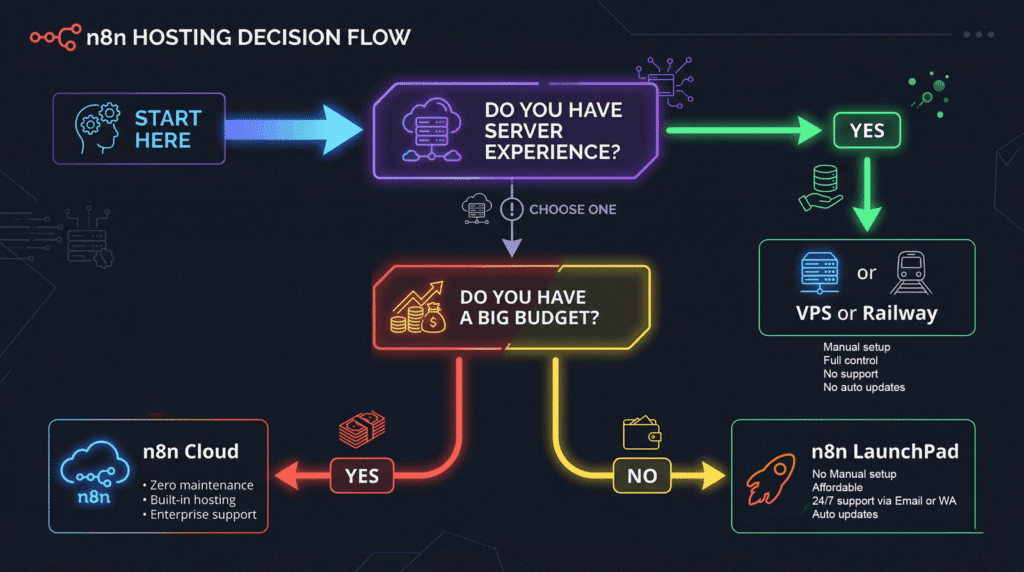
Option 1 — Self-Hosted (Free): Deploy n8n on your own VPS. A Hetzner or DigitalOcean server costs $5–10/month and runs unlimited workflows with unlimited executions. Zero per-execution charges, ever.
Option 2 — n8n Cloud: n8n’s official managed hosting. Starter plan starts at ~$20/month for 2,500 workflow executions/month. Pro plan is ~$50/month for 10,000 executions. Solid option, though it starts to get pricey at scale.
Option 3 — n8n LaunchPad (Most Affordable Managed Option): If you want n8n without touching a terminal or managing servers, n8n LaunchPad gives you a fully managed, pre-deployed private n8n instance starting at just $6/month. That’s not a shared environment — it’s your own n8n setup, ready in minutes, managed for you. It’s specifically built for founders, freelancers, and automation builders who want the power of n8n without the DevOps overhead.
The bottom line on pricing:
At equivalent automation volume, n8n is routinely 5–10x cheaper than Zapier. If you’re spending $99/month on Zapier, the equivalent workload on a managed n8n setup might cost you $6–20/month.
Integrations: Zapier Has More. n8n Has More Freedom.
On raw numbers, Zapier wins. It’s not even close — 6,000+ vs 1300+. If you’re evaluating tools purely by integration count, Zapier looks like the obvious choice.
But that comparison misses something important about how n8n actually works.
n8n has an HTTP Request node built directly into every workflow. This means if an app has an API (and practically every modern SaaS tool does), you can connect it to n8n — no native integration required. You can hit REST endpoints, send custom headers, parse the response, and pipe it into the next node. Additionally, n8n supports webhooks, GraphQL, and SOAP requests, and you can build and install custom community nodes for platforms that need them.
So yes, Zapier’s native integration count is much higher. But in practice, the gap shrinks when you factor in n8n’s ability to connect to anything with an API.
Where Zapier’s integration advantage is real:
Zapier’s connections to mainstream tools like Salesforce, HubSpot, Marketo, and dozens of enterprise apps are polished and regularly maintained. Authentication flows are smooth, field mapping is intuitive, and edge cases are handled. If you’re connecting CRMs, email tools, and project management apps, Zapier’s native connectors are genuinely better out of the box.
Where n8n’s flexibility wins:
When you need to connect to custom internal tools, niche APIs, or build something the integration store doesn’t cover — n8n is the only option. Zapier won’t let you call a raw API endpoint and do something creative with the response. n8n treats that as a first-class feature.
Workflow Complexity & Flexibility
This is the comparison that matters most for serious automation builders, and it’s not even close.
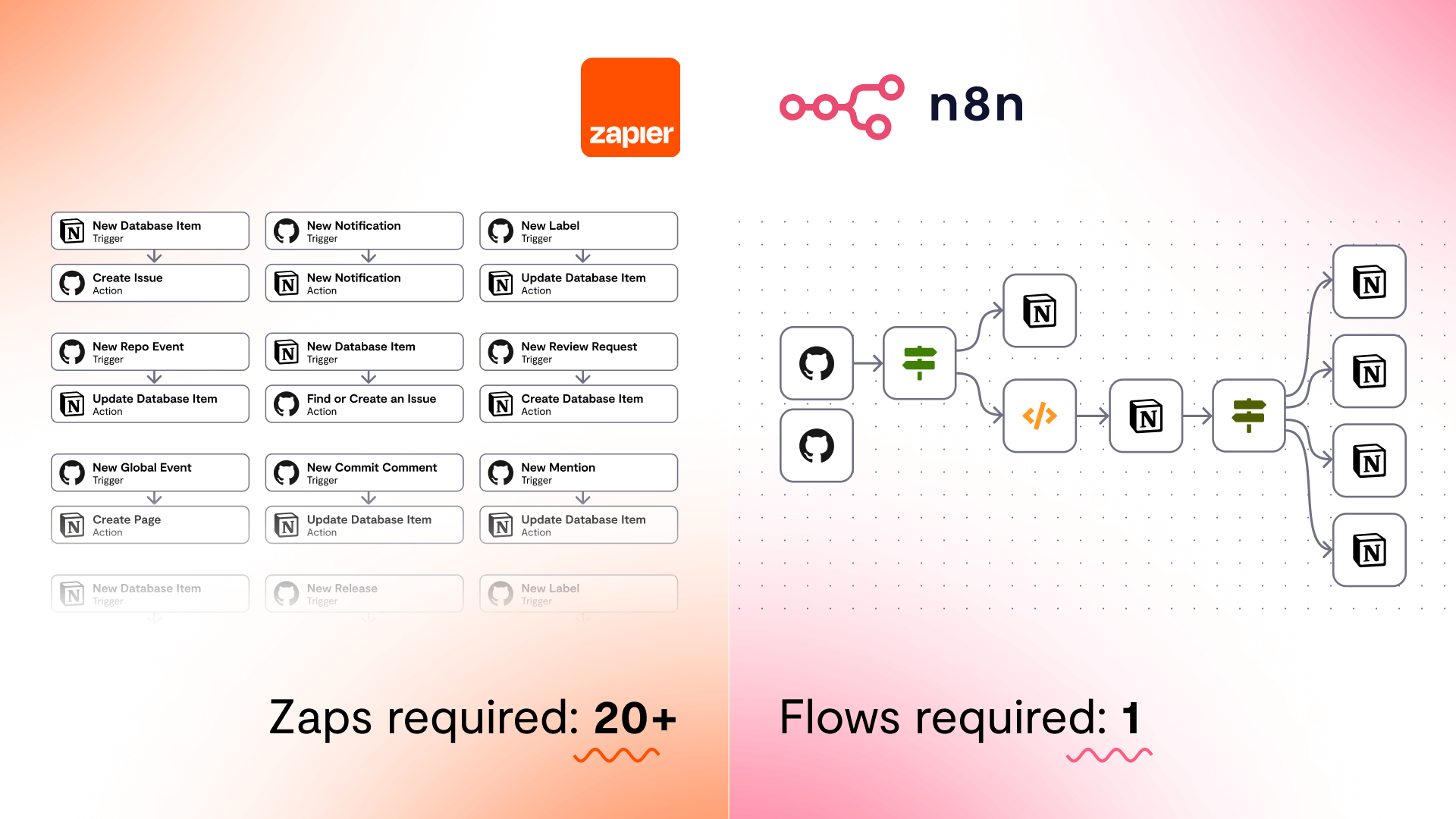
Zapier is fundamentally linear. A trigger fires, then actions happen in sequence. Yes, they added “Paths” (conditional branching) to paid plans, and “Filters” can be layered in. But Zapier’s architecture was designed for simple, linear flows — and that shows when you try to build anything moderately sophisticated.
Try to build a workflow in Zapier that does any of the following:
- Loops through an array of items and processes each one differently
- Waits for a human to approve something before continuing
- Calls an external API, checks the response, branches based on conditions, and retries on failure
- Runs as a sub-workflow called from another workflow
You’ll hit walls. Or you’ll hack together multiple Zaps, burn tasks on intermediate steps, and end up with a fragile system that’s hard to debug.
n8n is built for complexity from the ground up:
- Loops: Iterate over lists and arrays natively. Process every row in a spreadsheet, every contact in a CRM pull, every product in an order.
- Branching: IF nodes, Switch nodes — proper conditional logic, not a workaround.
- Code nodes: Drop into JavaScript or Python mid-workflow to handle data transformations, custom logic, or anything the visual nodes don’t cover.
- Sub-workflows: Build modular automation systems where workflows call other workflows.
- Wait nodes: Pause execution for a set time, wait for a webhook, or hold for manual approval.
- Error handling: Dedicated error trigger nodes that fire when something breaks — so you can build retry logic instead of workflows that silently fail.
Real example: Imagine a workflow that pulls new leads from a form, enriches each lead via an external API, checks if that lead already exists in your CRM, adds them if they don’t, sends a Slack notification with the contact details, and logs any failures to a Google Sheet. In Zapier, you’d need multiple Zaps, filters, and a prayer. In n8n, it’s one workflow with a loop, an IF check, and an HTTP Request node. Built in an afternoon.
Ease of Use: Let’s Be Honest
Zapier is easier. Full stop.
The onboarding flow is one of the best in B2B SaaS. Within 5 minutes of signing up, you’ve connected two apps and your first automation is running. No documentation needed. No tutorials. Just a clean, guided interface that holds your hand through the whole setup.
n8n has a steeper learning curve. The node-based editor is powerful but unfamiliar if you haven’t used something like it before. Understanding how data flows between nodes as JSON objects takes adjustment. Debugging when something breaks isn’t as friendly. And the first time you open a blank workflow canvas, it can feel overwhelming.
That said, the learning curve isn’t as steep as people assume, and it has a clear ceiling. Most people are building confidently in n8n within a few days of consistent use. The n8n community is active, there are thousands of workflow templates available, and the documentation has improved significantly over the past two years.
The honest take: If you need something working in the next 30 minutes and you’ve never used automation tools before — Zapier. If you’re willing to invest a few hours learning a tool that will save you hundreds of dollars per month and give you 10x more capability — n8n.
The managed hosting route (like n8n LaunchPad) removes the infrastructure barrier entirely, so the only learning curve left is the interface itself — which is manageable.
Self-Hosting & Data Privacy: A Huge Deal for the Right Users
Zapier simply doesn’t offer self-hosting. Every piece of data flowing through your automations — customer emails, CRM records, payment data, form submissions — passes through Zapier’s cloud servers. For most use cases, this is an acceptable trade-off. But it’s a trade-off, not a non-issue.
For anyone operating under GDPR, HIPAA, or similar data regulations, this becomes a real compliance consideration. For agencies handling sensitive client data. For B2B SaaS companies with data residency requirements. For anyone whose business is their data.
n8n’s self-hosting capability changes this entirely.
When you self-host n8n, your data never touches n8n’s servers. It never touches any third-party server that isn’t explicitly in your workflow. You control where it runs, how it’s secured, who has access, and how long data is retained.
This isn’t just a philosophical point — for regulated industries, this is the difference between using the tool and not being able to use it at all.
Even if you’re using a managed n8n service like n8n LaunchPad, you’re getting a private instance — not a shared multi-tenant setup. Your workflows are isolated. Your data stays with you.
Zapier can’t offer this at any price point. That’s a permanent structural difference between the two products.
Performance & Execution Speed
Zapier’s cloud infrastructure is battle-tested. Millions of Zaps run daily. Uptime is generally excellent, and reliability is rarely a concern.
But there’s a performance detail most people don’t mention: Zapier’s free and entry plans use polling. Instead of reacting to events in real-time, Zapier checks for new triggers every 15 minutes (free) or every 2–5 minutes (paid). That means if something happens in your trigger app, your automation might not run for several minutes.
n8n handles this differently. Webhooks are a first-class feature at every level — free, cloud, and managed. When your trigger fires, the workflow starts immediately. Real-time is the default, not a paid upgrade.
For workflows tied to customer-facing actions — form submissions, payment confirmations, support tickets — this execution speed difference actually matters.
On reliability: Self-hosted n8n depends on your server’s uptime. A properly configured VPS on a reputable host (Hetzner, DigitalOcean, AWS) will handle this just fine. Managed n8n services handle the server-side reliability for you, so you get Zapier-level reliability without the Zapier-level cost.
Who Should Use n8n vs Zapier?
Choose n8n if you:
- Are running moderate-to-high automation volume where Zapier’s task costs are becoming painful
- Need complex multi-branch workflows, loops, or in-workflow code execution
- Are dealing with sensitive data and need self-hosting or a private instance
- Want to build automation as a product or service (reselling, client work)
- Are comfortable with a slight learning curve in exchange for significantly more power
- Want to connect to custom or niche APIs that don’t have Zapier integrations
- Are a developer, technical founder, or hands-on builder
Choose Zapier if you:
- Are completely non-technical and need something running in under an hour
- Primarily need connections to mainstream enterprise SaaS (Salesforce, HubSpot, etc.) with polished, pre-built flows
- Are running very simple, low-volume automations where cost genuinely isn’t a concern
- Work in a large team where non-technical colleagues need to build and manage Zaps independently

How to Get Started With n8n (Without the Headache)
If you’re ready to make the switch, here are your options in order of effort:
1. Self-host on a VPS (Most Affordable Long-Term) Spin up a server on Hetzner ($4–6/month) or DigitalOcean, install Docker, and deploy n8n via their official Docker image. Takes about 20–30 minutes if you’re comfortable with a terminal. After that, you’re running unlimited workflows for the cost of your server.
2. n8n Cloud (Official Managed Option) n8n’s own hosted service. Clean setup, official support, and solid reliability. Starts at ~$20/month for 2,500 executions. Good option if you want the peace of mind of an official product with a proper SLA.
3. n8n LaunchPad (Best Value Managed Hosting) If you want a ready-to-use n8n instance without touching a server or paying n8n Cloud prices, n8n LaunchPad is the move. You get your own private n8n instance, fully deployed and managed, starting at $6/month. Login and start building automations in minutes — no Docker, no VPS, no server management. It’s specifically built for the non-technical founder or freelancer who wants n8n’s power without the infrastructure tax.
The Final Verdict
Zapier isn’t a bad product. It’s genuinely excellent at what it does — fast, reliable, accessible automation for mainstream use cases. The brand trust is earned.
But automation in 2026 isn’t the simple two-step Zap use case it was in 2015. Workflows are more complex, data privacy is a real concern, and the cost of running automation at scale on Zapier is genuinely hard to justify when n8n exists.
For anyone serious about automation — whether you’re a freelancer building client workflows, a founder running your own ops, or a developer building automated systems into a product — n8n is the better tool. It gives you more control, more capability, and dramatically more value per dollar.
If the server setup sounds intimidating, that’s not a reason to pay 5–10x more for Zapier forever. Managed n8n options exist. The gap is smaller than you think, and the savings start from day one.

Frequently Asked Questions
Is n8n better than Zapier?
For most technical users, growing businesses, and high-volume automation scenarios, yes. n8n is more powerful, significantly cheaper, and offers self-hosting that Zapier doesn’t. Zapier wins on ease of use and out-of-the-box integrations with mainstream tools.
Is n8n completely free to use?
The self-hosted version of n8n is free and open-source. You only pay for your server (typically $5–10/month on a budget VPS). Managed options like n8n Cloud or n8n LaunchPad have paid plans, with n8n LaunchPad starting at $6/month.
How much does Zapier cost per month?
Zapier’s paid plans start at roughly $19.99–$29.99/month for a low task allowance. Moderate users typically end up spending $49–$99/month. High-volume users and teams can easily hit $200–$400+/month.
Can non-technical users use n8n?
Yes, though there’s a real learning curve compared to Zapier. The visual node editor takes some getting used to, but with managed hosting removing the infrastructure complexity, most non-technical users can get up and running with workflows in a few days. The n8n community and template library make this significantly easier.
Does n8n have as many integrations as Zapier?
No — n8n has 1300+ native integrations vs Zapier’s 6,000+. However, n8n’s HTTP Request node lets you connect to virtually any API, which closes the practical gap significantly. For mainstream tools, Zapier’s integrations are more polished. For custom or niche tools, n8n’s flexibility wins.
Can I migrate my Zaps from Zapier to n8n?
There’s no official one-click migration tool, but most Zapier workflows can be recreated in n8n. The n8n community has extensive documentation, templates, and guides for replicating common Zap patterns. The migration effort is typically worth the long-term cost savings.
Is n8n secure and GDPR-compliant?
When self-hosted, n8n gives you complete control over your data — it never leaves your infrastructure unless you explicitly send it somewhere. This makes it one of the most privacy-friendly automation options available and well-suited for GDPR compliance. Even with managed hosting, providers like n8n LaunchPad give you a private isolated instance, not a shared environment.
What is the difference between n8n Cloud and self-hosted n8n?
Both run the same n8n software. The difference is who manages the infrastructure. Self-hosted means you deploy and maintain n8n on your own server (VPS, cloud instance, etc.). n8n Cloud is n8n’s official managed hosting service. Third-party options like n8n LaunchPad offer managed hosting at lower prices than n8n Cloud.
What is the difference between n8n Cloud and n8n LaunchPad?
n8n Cloud is the official hosted service from n8n themselves, starting at ~$20/month. n8n LaunchPad is a third-party managed hosting service that gives you the same self-hosted n8n experience (private instance, full control) at a significantly lower price starting at $6/month. It’s ideal for cost-conscious founders and freelancers.
Is Zapier still worth using in 2026?
For non-technical users running simple automations with mainstream tools, Zapier is still worth using. Its polish and integration library remain best-in-class. But for anyone running moderate-to-high automation volume, building complex workflows, or looking for Zapier alternatives to cut costs — the answer is increasingly no. n8n and other alternatives have closed the capability gap significantly.
What are the best Zapier alternatives in 2026?
n8n is widely considered the best Zapier alternative for technical users and power builders. Other notable alternatives include Make (formerly Integromat), Activepieces, and Pipedream — each with different pricing models and strengths.
Found this useful? Share it with someone stuck in a Zapier pricing hell. And if you’re ready to try n8n without the server setup, check out n8n LaunchPad — fully managed n8n instances starting at $6/month.