
If you’ve spent any time in automation communities — Reddit, Skool, Facebook groups, wherever — you’ve seen this debate play out a hundred times. Someone asks “should I use n8n or Pabbly Connect?” and the replies turn into a small war between people who swear by one tool and people who’ve never touched the other.
Here’s the thing: both tools are good. That’s not a cop-out, that’s the actual problem. They’re built for slightly different people, and most of the “n8n vs Pabbly Connect” content out there either doesn’t explain why that matters or just picks a side and stops there.
This post breaks down the real differences — pricing that actually reflects 2026 numbers, how each tool handles complex workflows, what the learning curve looks like, and who each one is genuinely built for. By the end, you’ll know which one fits your situation, not just which one has a flashier landing page.
Table of Contents
What Is n8n?
n8n (pronounced “n-eight-n,” short for “nodemation”) is an open-source workflow automation tool. Think of it as the more technical, more powerful sibling of Zapier — except it’s open-source, so you can self-host it for free, and it gives you a level of control that most “no-code” tools simply don’t offer.
The core idea behind n8n is the node-based canvas. You drag nodes onto a workspace, connect them with lines, and each node represents a trigger, an action, a condition, or a piece of logic. It looks intimidating at first, but once it clicks, it’s one of the most flexible automation systems you can get your hands on — including built-in support for JavaScript/Python code nodes when you need to do something custom.
What makes n8n stand out in 2026:
- 1300+ native integrations plus an HTTP Request node that lets you connect to literally any API with a REST endpoint
- Self-hosting option — run it on your own server (or a managed instance) and pay zero per-task fees
- AI-native features — native nodes for OpenAI, Anthropic, LangChain agents, vector stores, and AI Workflow Builder credits on cloud plans
- Execution-based billing on cloud — you’re charged per workflow run, not per individual step inside that workflow
- Fair-code license (Sustainable Use License) — free for internal business use, even commercially
The trade-off? There’s a learning curve. If you’ve never built a workflow before, the node canvas can feel like a lot at first. But for anyone coming from a technical background — or anyone willing to spend a weekend learning it — n8n opens doors that simpler tools keep locked.
What Is Pabbly Connect?
Pabbly Connect is a cloud-based automation tool that positions itself as the affordable alternative to Zapier — and honestly, it’s earned that reputation. It uses a simple, linear, step-by-step builder: pick a trigger, add actions one after another, and that’s your workflow. No canvas, no node logic, no code.
It supports over 2,000+ apps and has built a loyal following, especially among small business owners, agencies, and solopreneurs who got burned by Zapier’s pricing once their task counts started climbing.
What makes Pabbly Connect stand out in 2026:
- One-time lifetime plans — pay once (deals often start around $249) and never pay a subscription again for that tier
- Doesn’t bill for internal operations — filters, routers, formatters, and iterators don’t count against your task limit, only the “billable” actions do
- Simple linear builder — genuinely beginner-friendly, you can build your first working automation in minutes
- 2,000+ app integrations including a lot of niche marketing and e-commerce tools
- No coding required, anywhere — there’s no code node, no JSON editing, nothing technical to touch
The trade-off here is flexibility. Pabbly’s linear, top-to-bottom structure works great for simple “if this happens, do that” automations. But once your workflow needs branching logic, loops, custom data transformations, or AI agent behavior, you start running into walls that n8n simply doesn’t have.
Pricing Comparison: What Will It Actually Cost You?
This is where most comparison posts get lazy and just paste a pricing table without context. Let’s actually break this down by scenario, because the “cheapest” option depends entirely on how you’re running it.
Pabbly Connect Pricing (2026)
| Plan | Price | Tasks/Month | Notes |
|---|---|---|---|
| Free | $0 | 100 tasks | Good for testing only |
| Standard | ~$16–19/mo | 12,000 tasks | Annual billing gets the lower rate |
| Pro | ~$33/mo | 24,000 tasks | Annual billing |
| Ultimate | ~$67/mo | Up to 300,000 tasks | Annual billing |
| Lifetime (one-time) | Starting ~$249 | 3,000 tasks/month, scaling up to ~$699 for Ultimate tier | One-time payment, no recurring fee ever |
The lifetime deal is genuinely Pabbly’s biggest selling point. If you know your task volume won’t explode, paying once and being done with it is appealing — especially for small businesses on a fixed budget. Also worth noting: filters, formatters, routers, and delay steps inside a workflow don’t count as tasks, which is more generous than how a lot of competitors meter usage.
n8n Pricing (2026)
| Option | Price | Executions/Month | Notes |
|---|---|---|---|
| Self-Hosted Community Edition | Free (software) | Unlimited | You only pay for server hosting |
| n8n Cloud Starter | ~$20–24/mo | 2,500 executions | Managed hosting, 14-day trial |
| n8n Cloud Pro | ~$50–60/mo | 10,000 executions | Managed hosting |
| n8n Cloud Business | ~$667–800/mo | 40,000 executions | SSO, advanced controls |
| Managed Self-Hosted (e.g., n8n LaunchPad) | $6–$8/mo | Unlimited executions | Fully set up, no DevOps needed |
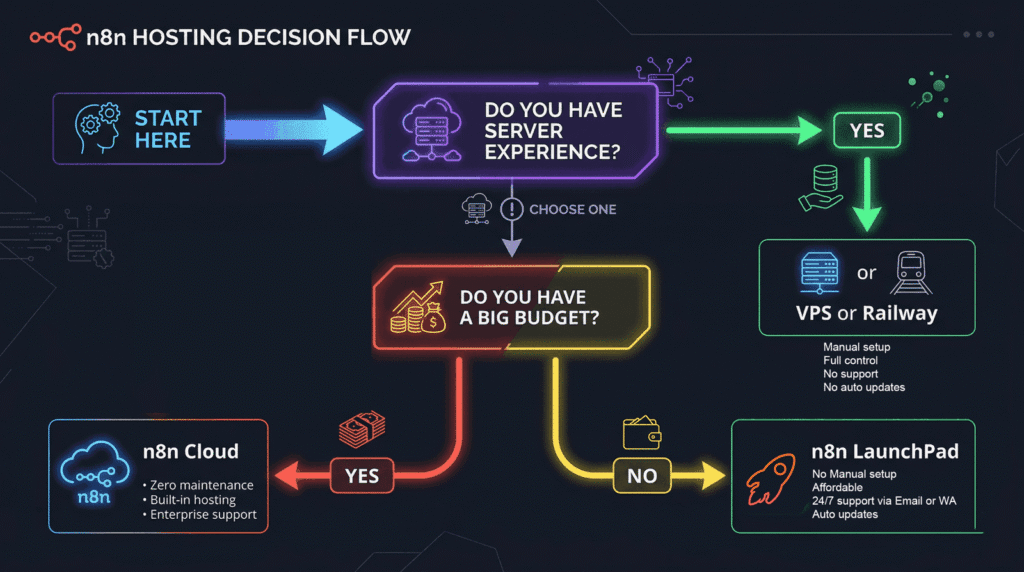
Here’s the part most “n8n vs X” articles either skip or bury: n8n’s free self-hosted Community Edition has every core feature and zero execution limits. The catch is that “free” actually means “free software, but you need to set up and maintain a server” — which means Docker, VPS configuration, SSL, updates, backups. For a non-technical founder, that’s not really free, that’s a part-time DevOps job.
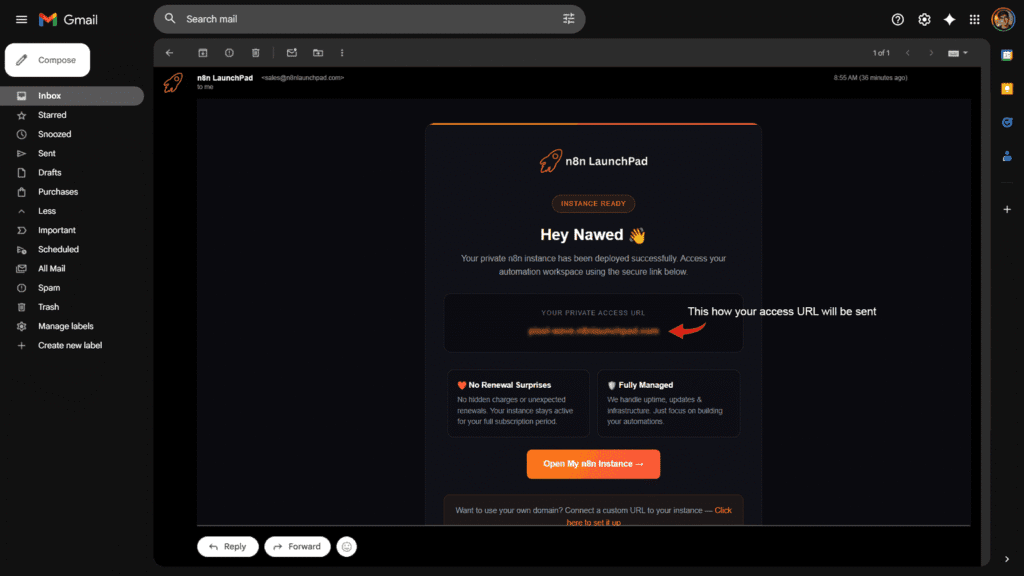
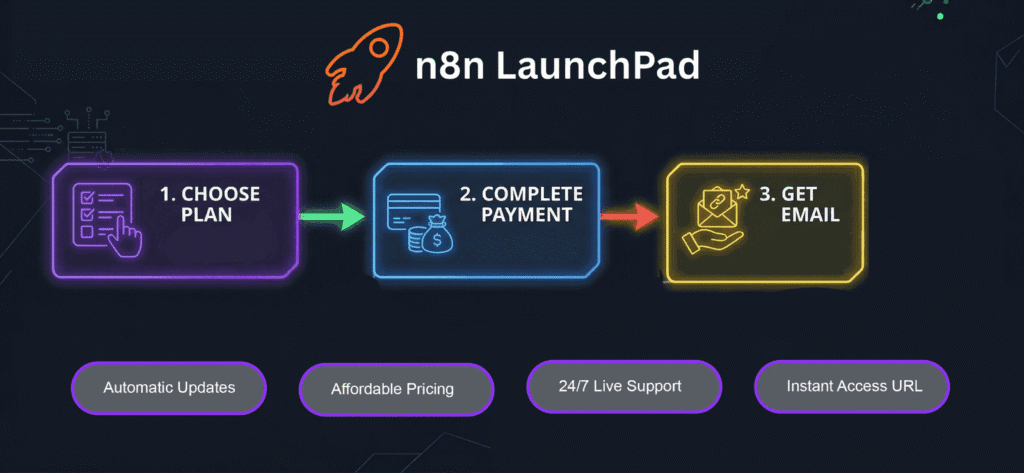
That’s exactly the gap managed self-hosted services fill — you get the unlimited, unrestricted Community Edition of n8n running on a properly configured instance, without touching a terminal. n8n LaunchPad, for example, runs at $6/mo and $8/mo for pre-deployed, ready-to-use n8n instances — which works out to roughly the same price range as Pabbly’s monthly Standard plan, but with unlimited executions instead of a 12,000-task ceiling, and unlimited workflows from day one.
So Which Is Cheaper?
- For light, occasional automations (under a few thousand tasks/month, simple linear flows): Pabbly’s free or Standard plan is hard to beat on simplicity.
- For anything with real volume or complex multi-step workflows: n8n’s per-execution billing (where one execution = one full workflow run, regardless of steps) crushes per-task billing models. A 15-step workflow that runs 1,000 times is 1,000 executions on n8n but could be 15,000 billable tasks elsewhere.
- For long-term cost control: self-hosted n8n (managed or DIY) removes the “task limit” conversation entirely. You’re not recalculating your plan every time your business grows.
Feature-by-Feature Breakdown
1. Workflow Complexity & Logic
This is the single biggest differentiator. Pabbly Connect’s linear builder is excellent for straightforward automations — new lead comes in, add to CRM, send a Slack notification, done. But the moment you need branching paths, conditional logic that splits in multiple directions, loops that process arrays of data, or merging multiple data sources back into one flow, Pabbly starts feeling restrictive.
n8n’s canvas was built for exactly this. You can branch a workflow five different ways, run loops over JSON arrays, merge branches back together, and add a code node to transform data however you want — all on the same canvas, visually. If you’re automating anything beyond “Tool A talks to Tool B,” n8n gives you room to grow without hitting a ceiling.
2. AI & LLM Integration
This is where the gap has widened the most in the last year. n8n has leaned hard into AI-native workflows — native nodes for connecting to OpenAI, Anthropic’s Claude, and other LLM providers, plus LangChain-based agent nodes, memory nodes, and vector store integrations. You can build genuine AI agents that reason, call tools, and make decisions — not just “send this text to GPT and paste the response somewhere.”
Pabbly Connect supports connecting to AI tools via its standard integrations and webhooks, but it doesn’t have the same depth of native AI-agent infrastructure. If your roadmap includes AI-powered automations — and in 2026, whose doesn’t — n8n currently has a real head start here.
3. App Integrations
Pabbly Connect claims 2,000+ app integrations, and n8n sits at 1300+ native integrations — but n8n’s HTTP Request node effectively means “anything with an API is connectable,” which closes most of that numeric gap in practice. For very niche apps with no public API, Pabbly’s larger pre-built library might have an edge. For anything mainstream — CRMs, email platforms, payment gateways, spreadsheets, databases — both tools have you covered.
4. Ease of Use & Learning Curve
No sugarcoating this one: Pabbly Connect is easier to pick up. If you’ve never built an automation in your life, you can have something working within 20–30 minutes. The linear structure maps directly to how most people think about a process — step 1, then step 2, then step 3.
n8n has more of a learning curve, mainly because the node canvas requires you to think in terms of data flow, JSON structure, and branching logic. It’s not “hard” so much as it’s a different mental model — closer to how a developer thinks about a flowchart. Once you get past the first few workflows, most people find it actually faster to build complex automations in n8n than to fight Pabbly’s linear structure into doing something it wasn’t designed for.
5. Data Handling & Transformations
n8n gives you direct access to the underlying JSON at every step, plus expression syntax (and full code nodes) to transform data however you need — string manipulation, date formatting, math, API response parsing, all inline. Pabbly Connect has built-in formatter steps for common transformations (text, date/time, number formatting) which cover most everyday use cases, but for anything genuinely custom, you’re more limited.
6. Reliability & Error Handling
Both platforms offer retry logic and error notifications. n8n’s error workflows let you build a dedicated “if this fails, do this” flow — including alerting, logging to a database, or triggering a fallback path — which is valuable once you’re running automations that actually matter to your business. Pabbly offers error notifications via email but with less granular control over custom failure-handling logic.

Who Should Use Pabbly Connect?
Pabbly Connect makes the most sense if:
- You’re running simple, linear automations — lead capture → CRM → notification, that kind of thing
- You want zero learning curve and need something working today
- You like the idea of a one-time lifetime payment and predictable costs
- Your automations don’t involve heavy branching, loops, or AI agents
- You’re a small business owner who wants “set it and forget it” without touching technical settings
Who Should Use n8n?
n8n is the better fit if:
- Your workflows involve multiple conditions, branches, loops, or data transformations
- You’re building or planning to build AI-powered automations (agents, chatbots, content pipelines)
- You want execution-based pricing that scales better as your automation volume grows
- You’re comfortable with (or willing to learn) a visual node-based builder
- You want the option to self-host — either yourself or via a managed service — for long-term cost control and full data ownership
The Self-Hosting Question Nobody Talks About Enough
Here’s something that gets lost in most comparisons: Pabbly Connect is cloud-only. Your data, your workflows, your automation logic — it all lives on Pabbly’s servers, and you’re locked into whatever pricing tier matches your usage forever.
n8n’s open-source nature means you genuinely own your automation infrastructure. The Community Edition is free, has zero execution limits, and includes all 1300+ integrations. The only real barrier for most people is the setup and maintenance — server provisioning, Docker, SSL certificates, updates, backups.
That’s the exact gap that managed self-hosted n8n services were built to close. A service like n8n LaunchPad gives you a pre-deployed, fully configured n8n instance — unlimited workflows, unlimited executions, no DevOps required — starting at $6/mo. You get the cost-efficiency and flexibility of self-hosted n8n without needing to know what a Docker container even is.
If you’re choosing between Pabbly’s $19/mo plan (capped at 12,000 tasks) and a managed n8n instance at $6–8/mo (unlimited executions, full canvas, AI nodes, code nodes, the works) — it’s worth at least testing both before committing to a lifetime deal.
Final Verdict
There’s no universal winner here, and anyone who tells you otherwise is selling something.
Pabbly Connect is a solid, affordable choice for simple, predictable automations — especially if you value a one-time payment and a flat learning curve. It does what it advertises, and for a lot of small businesses, that’s genuinely enough.
n8n is the more powerful, more future-proof option — particularly if your automations are going to grow in complexity, involve AI, or need to scale without hitting arbitrary task caps. The learning curve is real, but it pays off fast once your workflows get past the “simple” stage. And with managed self-hosted options now available for $6–8/mo, the “n8n is too technical” objection is mostly outdated.
If you’re not sure which camp you fall into yet, that’s fine — both tools offer free trials or free tiers. Build the same automation in both, and you’ll know within an hour which one fits how your brain works.
Frequently Asked Questions
Is n8n better than Pabbly Connect?
It depends on your needs. n8n is more powerful and flexible for complex, multi-step, or AI-driven workflows, and offers better long-term cost control through execution-based pricing and self-hosting. Pabbly Connect is easier to learn and offers simple, predictable pricing (including one-time lifetime plans) for straightforward automations.
Is Pabbly Connect cheaper than n8n?
Pabbly’s entry-level plans and lifetime deals can be cheaper for low-volume, simple automations. But n8n’s free self-hosted Community Edition (or a managed instance starting around $6/mo) offers unlimited executions, which often works out cheaper for anyone running more than a handful of automations regularly.
Can I self-host Pabbly Connect like n8n?
No. Pabbly Connect is a closed, cloud-only platform — there’s no self-hosted version. n8n is open-source and can be self-hosted for free (Community Edition) or through a managed hosting provider.
Does n8n support AI workflows better than Pabbly Connect?
Yes, currently n8n has significantly deeper native AI integration — including LLM nodes, AI agent builders, memory, and vector store connections — compared to Pabbly Connect’s standard API-based integrations with AI tools.
Which tool is easier for beginners — n8n or Pabbly Connect?
Pabbly Connect has a gentler learning curve thanks to its simple, linear, step-by-step builder. n8n’s node-based canvas takes a bit more time to learn but offers far more flexibility once you’re comfortable with it.
What counts as a “task” in Pabbly Connect vs an “execution” in n8n?
In Pabbly Connect, a task is generally each billable action your workflow performs (filters, routers, and formatters don’t count). In n8n, one execution equals one complete run of an entire workflow — regardless of how many steps or nodes are inside it — which is why n8n tends to be more cost-effective for complex, multi-step automations at scale.
Can I migrate my workflows from Pabbly Connect to n8n?
There’s no direct one-click migration between the two platforms since they use different workflow structures (linear vs. node-based). However, you can rebuild workflows in n8n manually — and because n8n supports the same trigger/action concepts plus more advanced logic, most Pabbly workflows can be replicated and improved upon in n8n.